AI-suggested interview questions

Help Recruitis · Updated

Preparing well for an interview takes time. You have to read through the CV, compare it with the position's requirements and work out what to ask. That's why we've built AI-suggested interview questions.

The AI compares the candidate's CV with the job description for you and suggests a set of questions tailored to that specific person. You save time and use the interview to dig into what really matters: the experience that is key for the position, as well as anything in the CV that isn't entirely clear.

Where to find it

You'll find the suggested questions on the candidate card, in the interview tab.

Once the questions have been generated, you'll see a preview of a few sample questions recommended by the AI.

The button below the preview takes you to the interview question settings, where you can go through the whole set of questions and decide which ones you want to work with.

💡 This functionality is available from license Premium.
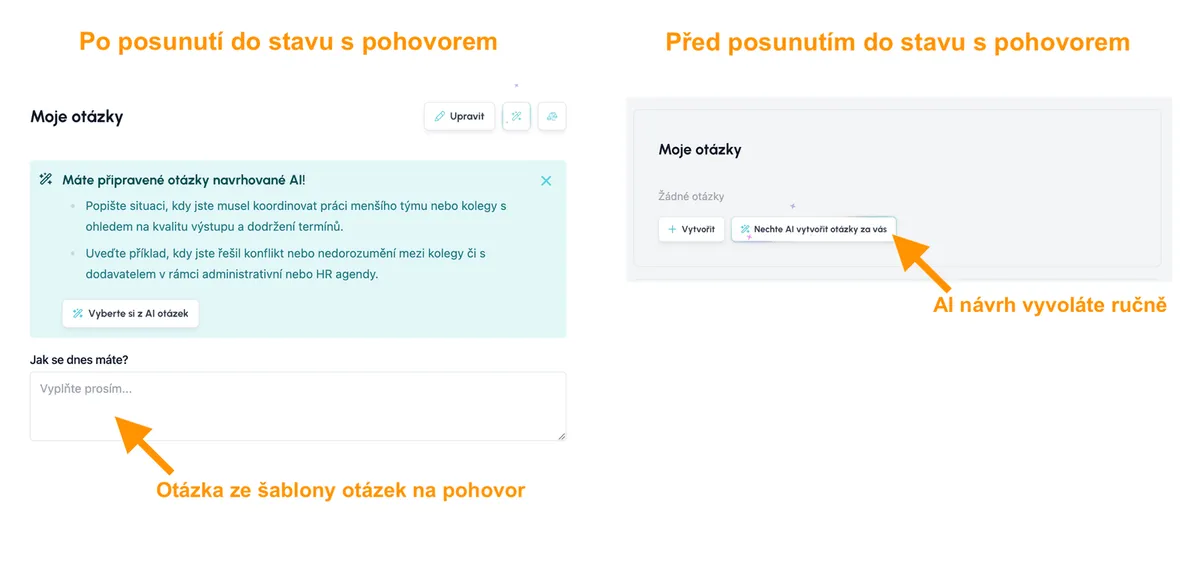
Preview of AI-suggested interview questions on the candidate card

How to generate the AI questions

There's nothing to switch on. You can get AI-suggested questions in two ways:

1. Automatically in the background

When you move a candidate to a status that represents an interview and has an interview action attached, Recruitis starts generating the questions automatically in the background – you don't have to do a thing.

By the time you open the candidate's interview tab, the suggestions will be waiting for you.

2. Manually on the interview card

On the interview card you can create questions yourself, or have the AI generate them again at any time.

💡 The language of the suggested questions follows the language of the position.

Adding questions to the interview

In the interview question settings, you decide for each suggested question whether to add it to your interview or discard it. You can add individual questions with the "+" button to the end of the list of selected questions, or grab them by the dots in the top left corner and drag them to exactly the place in the list where you want them.

Only the questions you confirm yourself make it into the interview.

If some questions aren't relevant, you can delete them from the list of generated questions using the trash can icon.

What questions the AI suggests

The AI suggests questions from six categories:

  • Behavioural: how the candidate acted in specific situations
  • Skills: verifying the abilities the position requires
  • Experience: following up on the experience listed in the CV
  • Values: whether the candidate shares what matters to you
  • Quick questions: short questions to quickly verify basic information
  • CV ambiguities: points that deserve an explanation

Each question also has a priority tag, so you can see straight away what to ask first. For questions about CV ambiguities, the tag also shows what type it is: a gap (e.g. a period with no work listed), an inconsistency (details in the CV don't match the requirements or contradict each other) or a clarification (the information just needs to be filled in).

Individual questions for each candidate

The questions are based on the content of the CV and the job description, which is why all suggested questions are individual. They only apply to the candidate you generated them for.

This is what sets them apart from interview question templates, which apply to all candidates for a given position. The two complement each other perfectly, though: the template makes sure you ask everyone the same core questions, and the AI questions help you go deeper with each candidate individually.

If you decide an AI question is great and suits everyone, simply remove its individual flag in the interview question settings. From then on, you'll ask it to all candidates for the position.
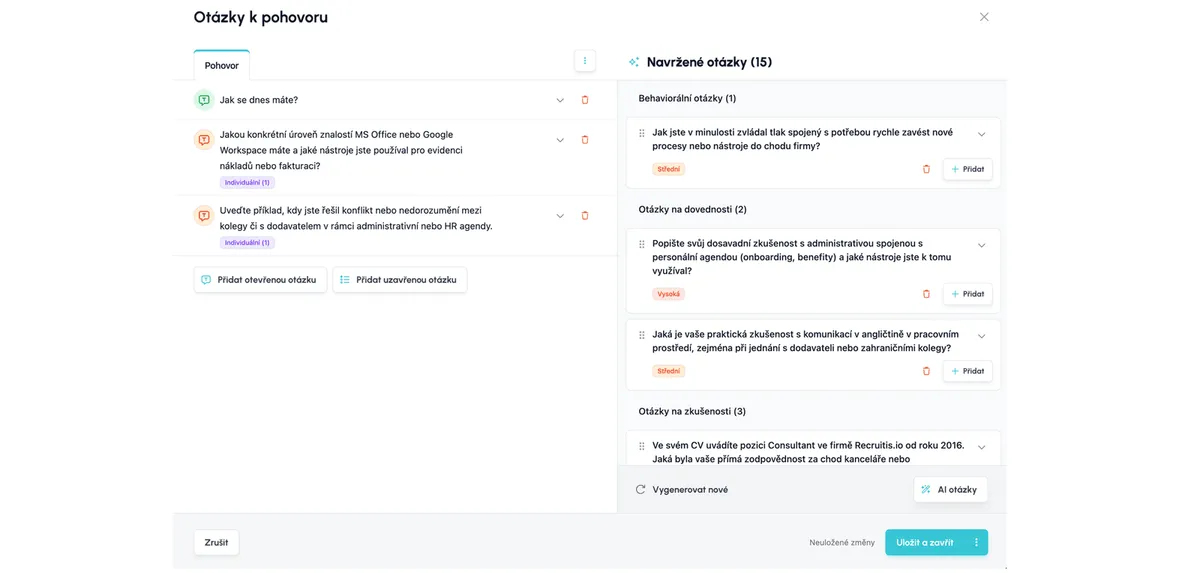
Interview question settings with AI-suggested questions

💡 Practical tips

  • Start with the highest-priority questions if you're short on time for the interview.
  • Don't ignore CV ambiguities. Questions about gaps and inconsistencies help you avoid unpleasant surprises after the candidate starts.
  • Combine the template with AI questions. You get comparable answers across candidates as well as an individual view of each of them.
  • Make it your own. The AI makes suggestions, but you have the final say. Only add the questions that make sense to you.

🛡️ Data processing

This AI feature uses a language model operated locally within ATS Recruitis' own infrastructure. Data is processed without involving any external AI service providers (third-party providers). Data never leaves our environment. The model is not fine-tuned on your data, nor does it learn from it in any other way. Inputs are used solely to process the specific request.

ATS Recruitis Features Webhooks for the Nelisa portal Impersonation Talent database and its possibilities Account line manager vs. account with limited rights Kanban Manage profile photos Processing the candidate list in the database (alternative to exporting candidate contacts) Connection of personnel advertising on the Linkedin network with ATS Recruitis Copying and moving a candidate Principles of functioning of the candidate card Recruitment flow and connection with email templates Upload a response from a LinkedIn ad Clearing the image cache when sharing a position on LinkedIn Adjusted dialogs for copying and moving a candidate Save the interview question template Scheduling a candidate interview right in your calendar Ad response source vs. candidate resource Candidate Service Prioritization (SLA) Management of communication regarding the rejection of applicants New GDPR filters in the database Reports and statistics GDPR consents Recovering a deleted user account Referral User management Multi-brand in email communication with candidates Filters in position lists NPS metric Applicant import history Practical example: candidate deletion vs. removing the answer Foreign advertisements Login to the mobile application using a QR code Offers to candidates (offer management) Mobile application - overview of functions Attachments of the applicant Confidential job position Custom field Place of work Preferred location Webhooks for system events Renaming the candidate Tagging notes Option to cancel sending NPS Expedited position publication Application for opening a position ("requests") SMTP settings for sending emails Elimination of the applicant Who has access to the candidate card Automatic response Classified ads and ad templates Sending SMS from ATS Recruitis Recruitis Bulk actions To cancel a delayed email send Position sharing opportunities through ATS Recruitis' internal career site Connection with the fajn-brigády.cz portal Withdrawal of consent to the processing of personal data A reminder to take action with the candidate Publications to the profession portal via API Send emails from Recruitis using your Outlook365 account The function to remove candidates from a position directly in the talent database Calculation of the reaction time between each flow state Interview scheduling by the candidate with evaluation of multiple calendars Scheduling an interview by a candidate with the possibility of multiple candidates on the same date Option to select the interview date for the candidate Ability to create multiple internal ATS Recruitis calendars Assigning a branch location from the JenPráce job portal codebook Email delivery problems (undelivered emails or spam) Creating a Polish advert Backward shift in recruitment flow Inserting images in the ad editor Option to disable SLA measurement for a specific position Filter NPS statistics results by recruiterFilter NPS statistics results by recruiter Ability to approve a job offer by multiple approvers Filtering in the database of candidates by start date and notice period Checklist Integration with the Slovenian Portal MojeDelo.com Timezones in calendar SLA Report Google Chrome Plugin Option to track phone rejection rate Filling in Candidate Personal Data Directly from CV Company Pages for Internal Positions within ATS Recruitis Custom HTML Job Offer Templates Notifications About New Candidates Including Manually Added Ones Phone calls via mobile app from desktop Two-Factor Authentication Multiple Entities Within One License Analytics - Requests Report Video Link in Position Editor "Position Settings" Menu Option to Disable Adding Smart Email to Copy of Messages to Candidates Connecting the Volnamista.cz Publication Channel Automated Sharing and Tagging of Candidates Option to Choose NPS Sender Analytics - Candidates Report Google Chrome Plugin for StartupJobs Portal Adding a Map to Email Template Scrolling the Notes Window Dynamic Loading of Filter Items via API Repeated Candidate Response to the Same Position Email Template Management Custom HTML Email Template Forcing Response Form Language Calendar (Redesign) Notifications About Emails Sent Only to System Email Filtering Positions by Ownership and Sharing Reporting Custom Field Values Working with interview invitations Google Chrome Plugin for Profesia Portal Micro-pools in the Candidate Database Email Sending Dialog (Redesign) Tag Categories Candidate Rejection Reasons Assigning Tasks New Candidate Card (Redesign) - Beta Version Switch Work Fields and Professions as Optional Field for Position Internal NPS Analytics - Custom Fields Report Request Approval Moving Accepted Candidates Outside Active Filter Items - Practical Usage Examples Candidate Card Recruitment Flow Position Candidate Actions - Copying and Moving Candidates to Position Working with Tags Working with Attachments Task Overview Completing Tasks Tasks Activity Feed Creating a Position Position Publication Interview Notes - Transition Between Old and New Card Google Chrome Plugin for LinkedIn Message Synchronization Google Chrome Plugin for Loading Gmail Messages AI for Creating Job Ad Texts Integration with Profesia Portal via Webhook Candidate Offer Form User Roles Integration with Indeed Portal Switching Between Multiple Accounts in ATS Recruitis Referral with Obtaining Recommended Candidate Consent Analytics - Introduction to BI Module Dashboard on the Main Page AI for Job Ad Competitiveness Comparison Message Sending Dialog Requisitions - HTML Editor and Templates Pre-rejection Communication Record with Candidate Candidate Responses in One Place Interview Planning Questions from Truly Good Candidates Working with Hiring Managers Interview Questions Setting and Monitoring Feedback Filtering Candidates in Database by Source Hot Candidates Gender Variable in Email Templates Online Interviews Directly from Recruitis Analytics - Positions Report Bulk Tagging Google Chrome Plugin for LinkedIn Quick Interview Planning GDPR Changes in the System Candidate Comparison Integration of New Responses from StartupJobs Integration with Slack.com Integration with CzechCrunch Jobs Custom Response Forms Notifications About All Notes on Your Positions Variable Recruitment Process Phases Analytics - Conversion Report Interview overview - Meetings menu Booking links - availability Automatic position sharing using filter items Integration with Skilleto portal Talent Database Facebook as a Publication Channel Filtering in Position Overview by Filter Items Competency Model Position Division in Recruitis System Creating a New Position Agency Portal as a Publication Channel Antivirus check of files uploaded to Recruitis ATS Setting automatic response version for individual positions New notes editor Position and requisition priorities Adding multimedia links to email template Sharing with External Users New Position List [Beta] Starting day management Setting the weight of a rejection reason Plugin for loading messages from Outlook Pin CV to your screen Manual candidate creation dialog Internal sourcing Custom view for the candidate table Priority Labels Custom settings for widget filters on the dashboard New Talent Pool [beta] New Position Detail [beta] New Job Listing [Beta] Why the New Design Is Amazing New Application Design Switchover on August 14th Agency candidate indicator Switching the candidate card view type Copying text from Microsoft Word into the position editor Discontinuation of the old candidate card New version of the mobile app (2.4.11) Automatic reply for candidates saved to the talent pool Creating a candidate from CV data (drag & drop) Installing the Outlook plugin Interview scheduling dialog AI functionality in ATS Recruitis Recruitis Plugin Recruitment Output Position statistics New login adapter Grade - AI comparison of candidate and position Extended tag filtering options AI Reporter Adjustable column width in the candidate list HiBob integration New look of the NPS report page New look of the Statistics page Booking links for LinkedIn sourcing Logging events in ATS Recruitis without connecting your calendar AI draft – your assistant for writing emails Video questionnaires and application forms New design of the NPS report and Statistics Saving and editing email templates Automatic extraction of CV data into structured fields Sorting candidates in the list by their requirements Integration with the InstaView platform New requisition design Sorting candidates by rating Company design Connect your AI assistant to Recruitis via MCP Checklist report System flow Form and questionnaire builder Permanent Switch-off of the Old Application Design on November 6 Interview Question Settings AI-suggested interview questions Postponing SLA

Related articles

15. 05. 2022

Webhooks for the Nelisa portal

Let ATS Recruitis automatically download your candidates from the Nelisa portal.

19. 05. 2022

Impersonation

Combining the answers of a historically depersonalized candidate with a new answer.

24. 05. 2022

Talent database and its possibilities

The talent database does not have to be used only for searching contacts for candidates.