Grade - AI comparison of candidate and position
Grade: AI that helps you pick the right candidate
When screening dozens or hundreds of CVs, it's easy to miss an important detail or spend too much time manually comparing candidates against a position's requirements. That's why we've added Grade to ATS Recruitis. It's an AI feature that automatically compares each candidate against a specific open position and shows you the result directly in their profile. Grade doesn't select or reject anyone.
It's a supporting tool that gives you a fast, clear and justified basis for your own decision, saving you the time you'd otherwise spend on manual comparison.
What Grade evaluates and how it works
Grade takes data from the candidate's profile:
- education,
- skills
- experience/seniority
- location
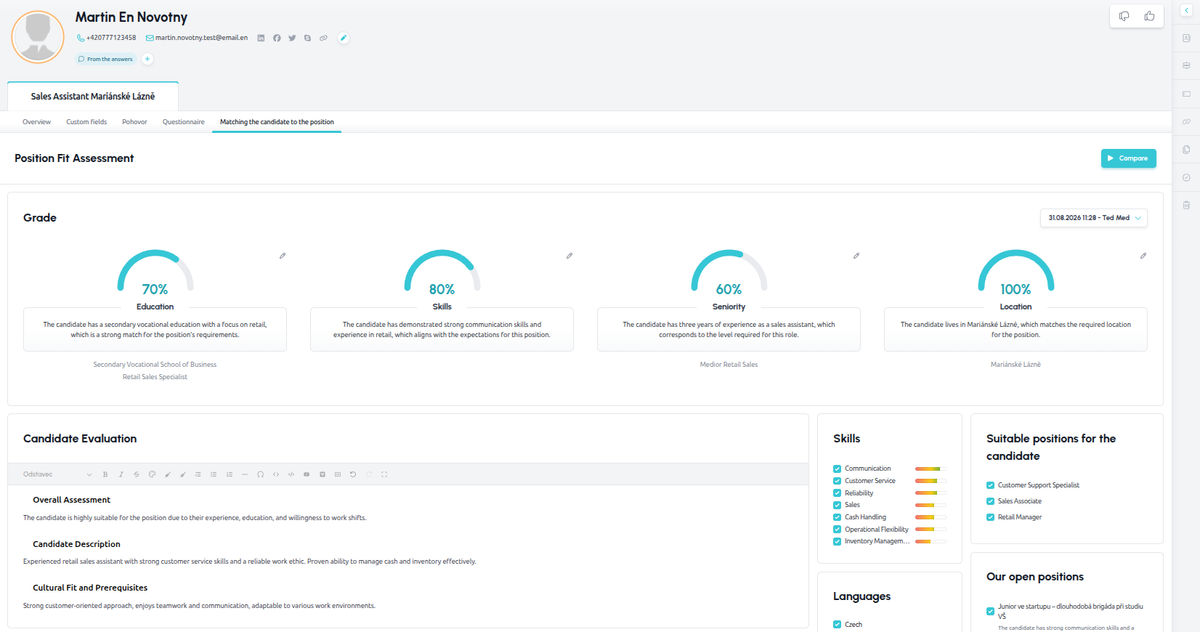
...and compares it against the description of the given position. It scores each of these four criteria separately, as a percentage, with a short written justification. On top of that, Grade generates an overall written evaluation: a summary of the candidate's profile and cultural fit, an overview of skills and languages, suggested interview questions, and recommendations for other open positions the candidate's profile might fit.
Because each criterion is shown separately rather than merged into a single number, you can immediately see why a candidate got a particular rating and judge for yourself whether it's relevant to your decision.
Where to find Grade
If you have this feature enabled, you'll find it directly in the candidate's profile, in a separate tab called "Candidate-position comparison". From there you can run the comparison, or regenerate it if some of the input data has changed.
So you don't need to go anywhere else or start anything specially. Grade is always shown for a candidate in relation to the specific position they applied for, or the one you're evaluating them against.
How to correctly interpret the evaluation
Grade is designed to support your decision-making, not to replace it. We recommend always reading the written justification for the score, not just the percentages.
The output shows you what the evaluation is based on and whether it makes sense in the context of the position. Open the candidate's profile and the position's requirements side by side and check that the source data Grade worked from is complete and up to date. An incomplete or inaccurate CV or position description can skew the evaluation up or down.
Most importantly: never use a low or high score as the sole reason for a decision about a candidate. The goal of Grade is to speed up and support your judgment, not replace it.
Editing the evaluation and change history
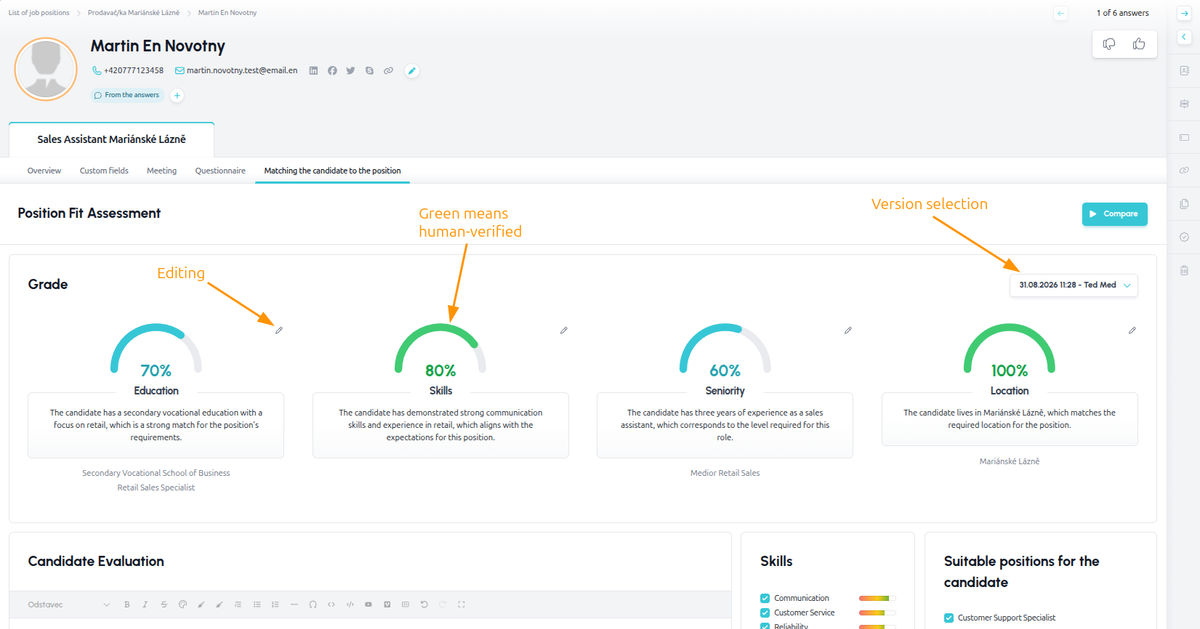
If you disagree with a partial evaluation, you can edit it directly in the interface - either the percentage or the written description.
Recruitis always keeps both the original AI evaluation and your edit, and you can switch between the two versions at any time. Every change is saved as a new version, so you have a clear history of who edited the evaluation and when.
💡 Only the candidate's direct owners can make edits, which also limits the ability of other recruiters not working on that particular hire to intervene.
What to watch out for
Grade works exclusively with textual and structured data (education, skills, experience and location). It doesn't process video, audio or photos, and doesn't perform any analysis of emotions or voice. Even so, the feature has its limitations, which are worth keeping in mind. The quality of the evaluation depends directly on the quality of the data: if the candidate's profile or the position description is incomplete, unclear, or contains contradictory information, the resulting score can be misleading.
In its current version, Grade also can't detect that a CV was generated by AI, so an unusually high score across all criteria can be a signal to take a closer look.
And if the candidate's profile or the position description mixes multiple languages, the resulting evaluation text may also be linguistically mixed.
Responsibility and human oversight remain with you
Grade never automatically moves a candidate forward in the recruitment process, rejects them, or otherwise changes their status. That decision always rests with the recruiter. That's exactly why the feature is designed as one tab in the candidate's profile, not as a gate you have to pass through: even if the evaluation fails to load for some reason, you can keep working with the candidate's profile as usual.
Grade works only with data you already have in the ATS: the candidate's CV and cover letter and the position description. It does not require or specifically evaluate sensitive personal data, and it does not process any biometric data (photos, audio or video).
Candidate data always stays within a controlled, contractually secured environment. It is never sent to public AI services such as ChatGPT and is not used to train AI models. The specific model and deployment are chosen according to the customer's needs and preferences:
- Microsoft Azure OpenAI in the Recruitis environment: processing takes place within the EU, and Microsoft processes the data as our contractual processor.
- Azure OpenAI in the customer's environment: Grade can connect directly to the customer's own Azure OpenAI, so the data stays within the customer's infrastructure and under the customer's own contracts.
- Local model on Recruitis infrastructure: processing takes place solely on our own servers within the EU, and the data never leaves our environment.
Grade and the EU AI Act
Because Grade produces an evaluation and profile of a specific person, the EU Artificial Intelligence Act (AI Act) classifies it as a so-called high-risk AI system used in recruitment. This isn't a reason for concern, but it's good to know about: using this feature comes with certain rules, both on our side as the technology's provider, and on your organization's side as the deployer.
As the provider, Recruitis is responsible for ensuring Grade is designed and documented in line with AI Act requirements - among other things, for the transparency of the evaluation, the human oversight capability described above, and keeping records of edits made to evaluations.
As the deployer, your organization also has its own obligations. These typically include designating a person responsible for human oversight of Grade's use in your company, assessing whether and how to inform candidates or an employee council about the use of AI in recruitment, and maintaining your own internal documentation on the feature's use where applicable.
This section is not legal advice. We recommend discussing the specific implications for your organization with your legal or compliance team. Recruitis support will be happy to provide more detailed AI Act documentation on the Grade feature on request, for your team's assessment.
Related articles
Webhooks for the Nelisa portal
Let ATS Recruitis automatically download your candidates from the Nelisa portal.
Impersonation
Combining the answers of a historically depersonalized candidate with a new answer.
Talent database and its possibilities
The talent database does not have to be used only for searching contacts for candidates.