Position
What is a position?
A position is an entity that gathers candidates for a given recruitment in one place. Working with candidates on a given position is governed by a specific recruitment flow that determines individual steps and actions in the recruitment process (link to article describing recruitment flow).
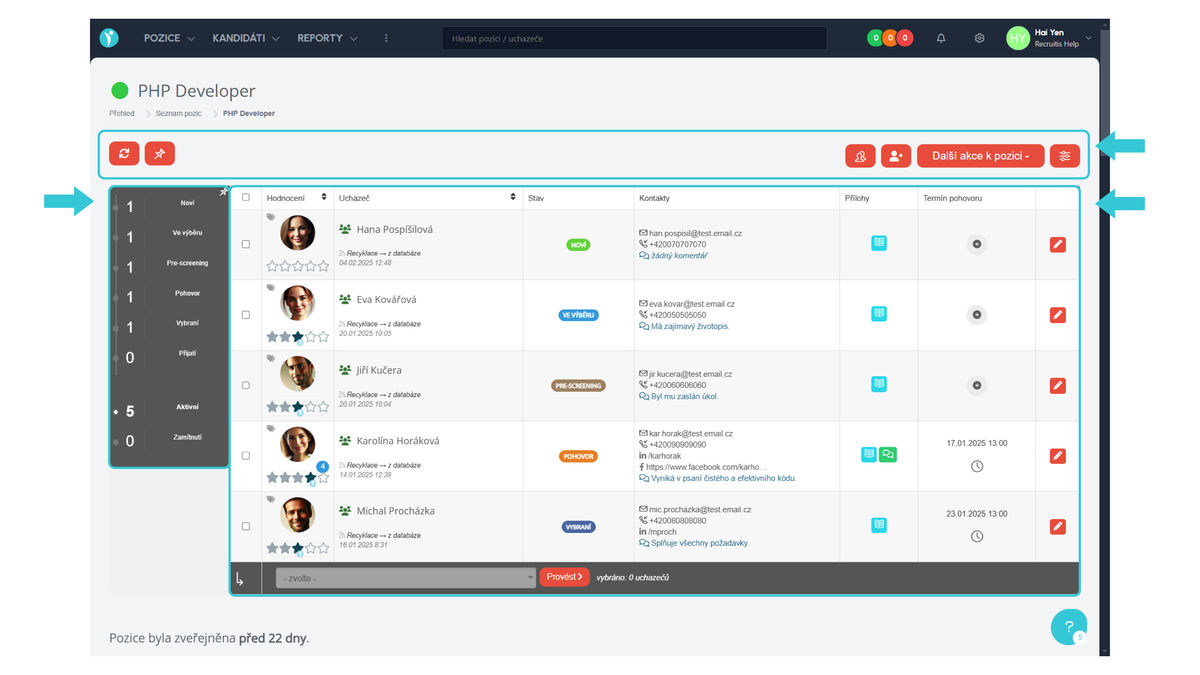
If you click on a specific position name, you will get to the so-called position detail. There you will find actions that can be performed with positions, such as: reloading candidates for the position (i.e., checking if someone new has arrived), managing applicants for the given position directly in the talent database, manually adding applicants, other position actions, and position settings.
Furthermore, you will find here an overview of the recruitment flow for the given position, which shows candidates in individual states, as well as a table with an overview of candidates with basic information. You can work with candidates individually or in bulk. Bulk actions can be found in the table footer and allow you to efficiently manage multiple candidates at once.
For each position, in addition to the recruitment workflow, you can also define a response form for the given position, filter items (i.e., tags for the position), or also a custom automatic response template different from other positions. The position settings button is used for this.
Where do we find positions?
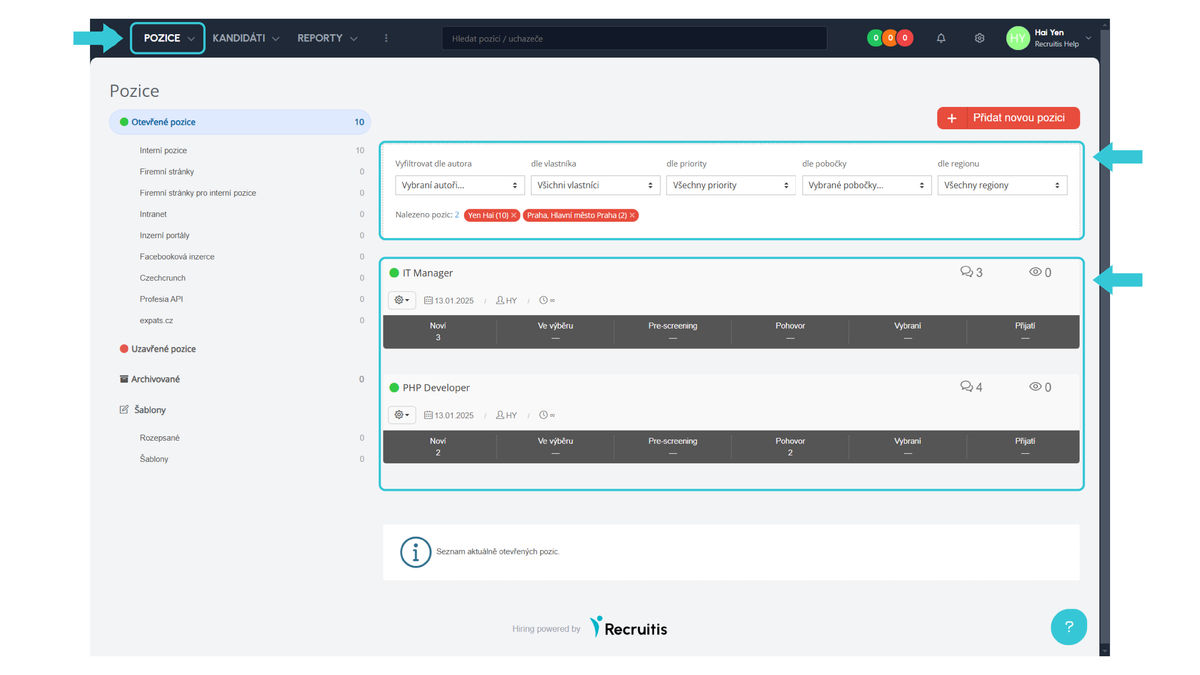
Specific positions can be found on the dashboard (where positions you have ownership rights to are displayed - meaning you are their authors or have them shared) or in the so-called position overview, which you can access by clicking "Positions" in the top menu.
Here you can also filter positions by position author or owner, position priority, or by branch or region where the position is published, and if you have them defined, also by custom filter items.
How to work with positions?
In general, you can work with positions in two ways:
- A position can be treated as a "job posting", so a new position is opened with each recruitment. After the recruitment ends, it is closed and subsequently archived.
- A position is treated as a "Job Position" and you can have such a position open all the time and continuously recruit new candidates for it when needed.
Both ways of working with positions are valid and depend only on your preference and way of working with positions. Each option also has its advantages and disadvantages and a different impact on statistics and reporting that should be considered before choosing an approach. Of course, it is possible to approach each position created in ATS Recruitis differently.
Positions can be in 3 states:
- Open: The position is published and candidates can apply for it.
- Closed: The position is no longer published, candidates cannot apply for it, but you can continue to work with the applied candidates just as with an open position.
- Archived: Recruitment for the given position is completely finished. If candidates did not give you GDPR consent beyond the given selection process, they are anonymized after the recruitment ends.
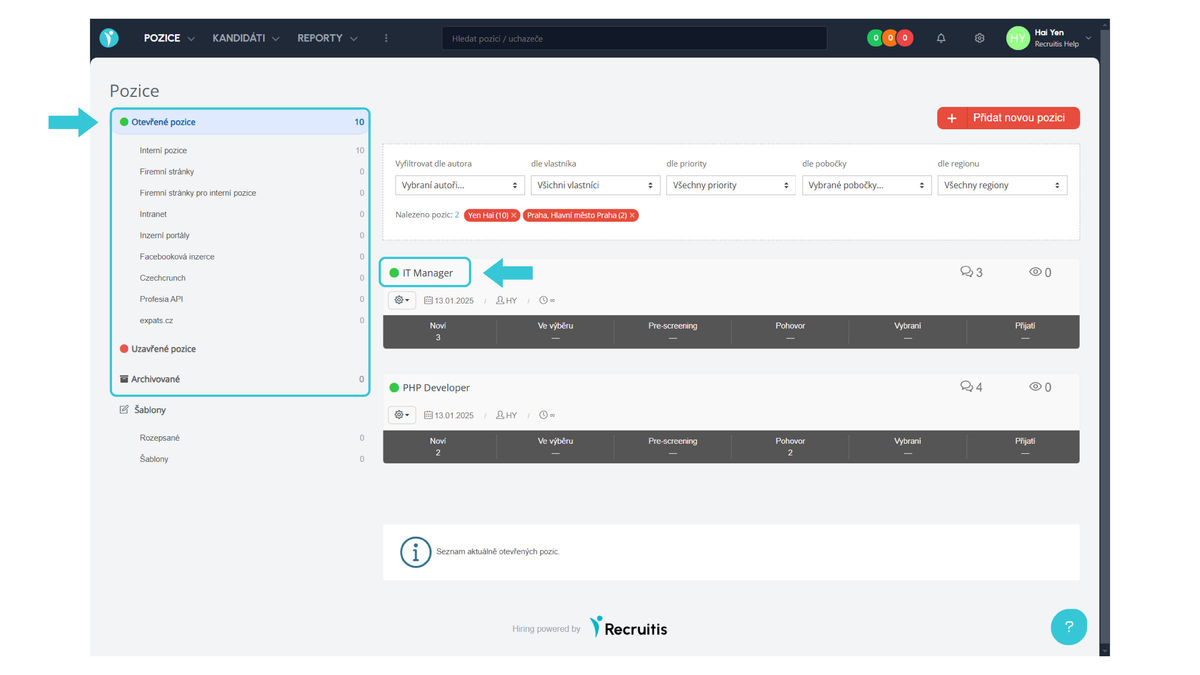
In the position overview, you can display positions in individual states using the left menu, where each individual position has a green or red dot before the name, by which you can tell whether it is an open or closed position.
Good to know
- In the open positions section in the left menu, you can see individual publication channels - if a position is published on multiple channels, it will appear in multiple menu items (in other words, the number of open positions may not necessarily be the sum of positions on individual channels).
- If a position is open constantly (and is not archived), candidates who did not give GDPR consent beyond the selection process will be anonymized after 1 year.
Related articles
Webhooks for the Nelisa portal
Let ATS Recruitis automatically download your candidates from the Nelisa portal.
Graphics and system appearance
Basic settings of graphic elements - logos and background.
Position editor settings
Select the optional items in the position editor that you want to display.