AI for Job Ad Competitiveness Comparison
The goal of the AI assistant for job ad competitiveness comparison is to give you a quick and clear market overview for your job ad and compare your offer, requirements, etc. with similar ads posted by your competitors.
How to invoke the assistant?
You can invoke the assistant in several places:
- In the position editor, i.e., when creating a job ad
- In the menu of an already created position
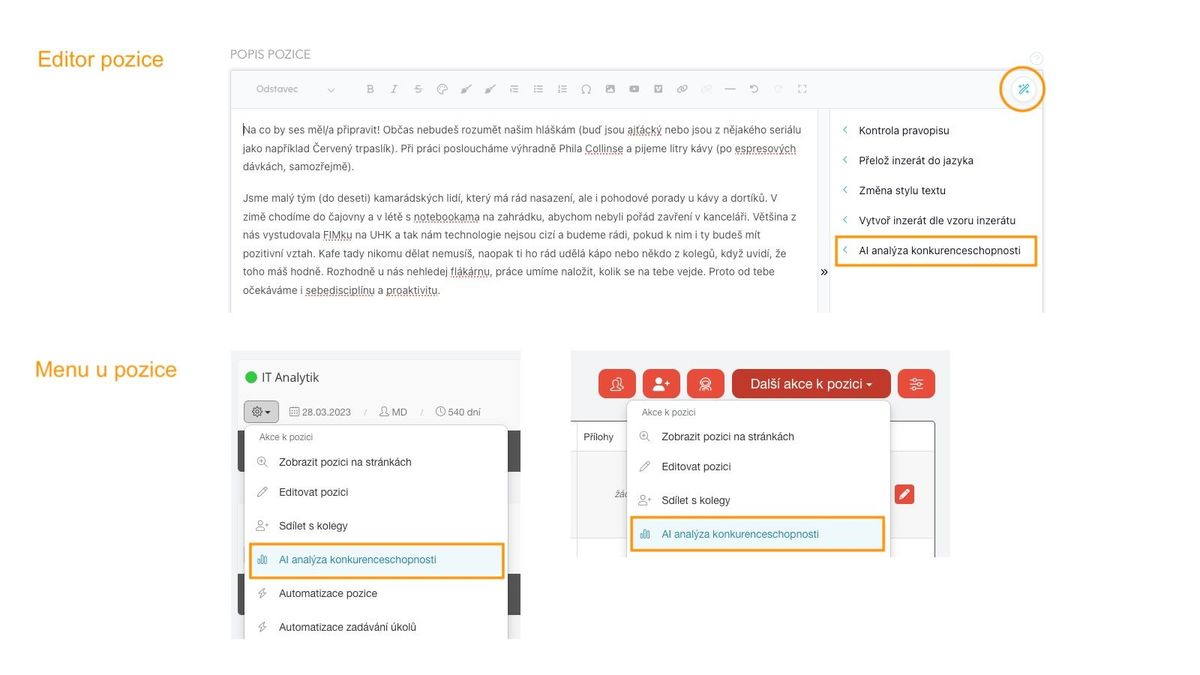
The analysis itself starts after clicking on the given menu item.
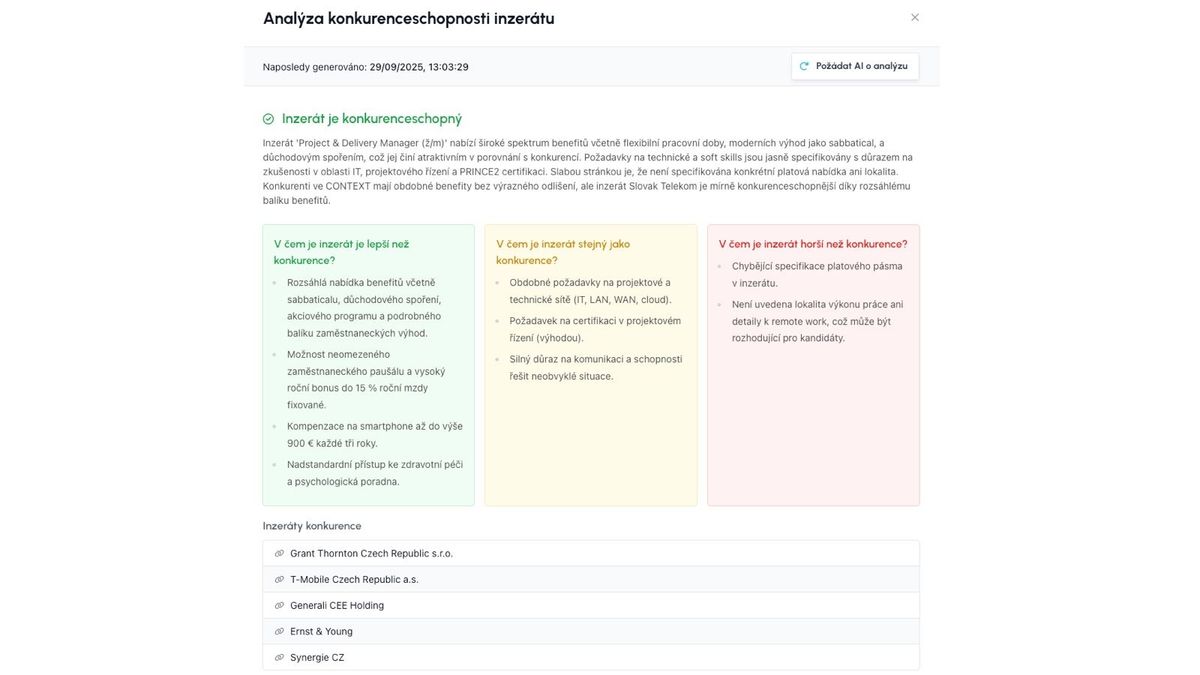
The result is then:
- A summarizing conclusion - whether the ad is or is not competitive
- A more detailed description of where the ad is:
- Better than competitors
- Same as competitors
- Worse than competitors
- Links to selected competing job offers
Good to know
- If a previous competitiveness comparison result already exists, AI is not called again, but if you want to trigger a new comparison based on changes, just click the "Ask AI for analysis" button
- The job title matters a lot - it carries the most weight when recognizing "similar" ads.
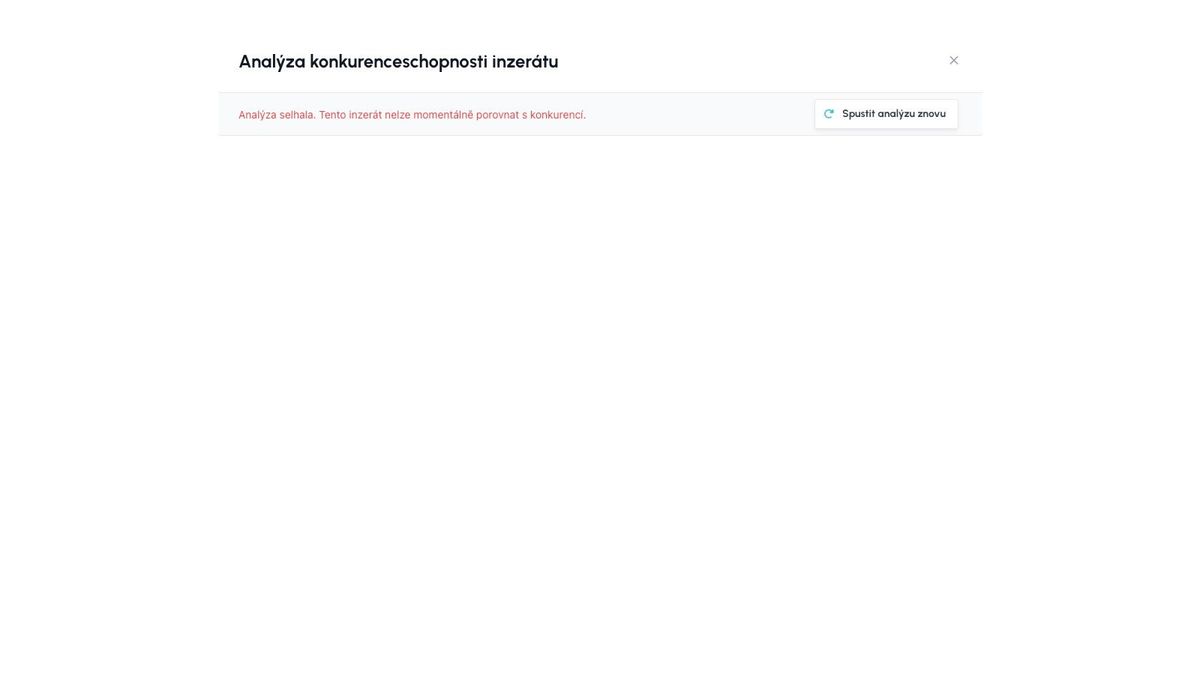
- If no similar ad can be found or if the connection fails, an error message "Analysis failed" will appear.
- This error can be caused either by a technical problem connecting to the AI module, or by a scenario where no competing offer can be found for the given ad (e.g., the position is insufficiently described, or it is a position that really does not exist on the market).
ATS Recruitis Features Webhooks for the Nelisa portalImpersonationTalent database and its possibilitiesAccount line manager vs. account with limited rightsKanbanManage profile photosProcessing the candidate list in the database (alternative to exporting candidate contacts)Connection of personnel advertising on the Linkedin network with ATS RecruitisCopying and moving a candidatePrinciples of functioning of the candidate cardRecruitment flow and connection with email templatesUpload a response from a LinkedIn adClearing the image cache when sharing a position on LinkedInAdjusted dialogs for copying and moving a candidateSave the interview question templateScheduling a candidate interview right in your calendarAd response source vs. candidate resourceCandidate Service Prioritization (SLA)Management of communication regarding the rejection of applicantsNew GDPR filters in the databaseReports and statisticsGDPR consentsRecovering a deleted user accountReferralUser managementMulti-brand in email communication with candidatesFilters in position listsNPS metricApplicant import historyPractical example: candidate deletion vs. removing the answerForeign advertisementsLogin to the mobile application using a QR codeOffers to candidates (offer management)Attachments of the applicantConfidential job positionCustom fieldPlace of workPreferred locationWebhooks for system eventsRenaming the candidateTagging notesOption to cancel sending NPSExpedited position publicationApplication for opening a position ("requests")SMTP settings for sending emailsElimination of the applicantWho has access to the candidate cardAutomatic responseClassified ads and ad templatesSending SMS from ATS Recruitis RecruitisBulk actionsTo cancel a delayed email sendPosition sharing opportunities through ATS Recruitis' internal career siteConnection with the fajn-brigády.cz portalWithdrawal of consent to the processing of personal dataA reminder to take action with the candidatePublications to the profession portal via APISend emails from Recruitis using your Outlook365 accountThe function to remove candidates from a position directly in the talent databaseCalculation of the reaction time between each flow stateInterview scheduling by the candidate with evaluation of multiple calendarsScheduling an interview by a candidate with the possibility of multiple candidates on the same dateOption to select the interview date for the candidate Ability to create multiple internal ATS Recruitis calendarsAssigning a branch location from the JenPráce job portal codebookEmail delivery problems (undelivered emails or spam)Creating a Polish advertBackward shift in recruitment flowInserting images in the ad editorOption to disable SLA measurement for a specific positionFilter NPS statistics results by recruiterFilter NPS statistics results by recruiterAbility to approve a job offer by multiple approversFiltering in the database of candidates by start date and notice periodChecklistIntegration with the Slovenian Portal MojeDelo.comTimezones in calendarSLA ReportRejection ReasonsGoogle Chrome PluginExternal Sharing of Candidate CardsOption to track phone rejection rateFilling in Candidate Personal Data Directly from CVCompany Pages for Internal Positions within ATS RecruitisCustom HTML Job Offer TemplatesNotifications About New Candidates Including Manually Added OnesPhone calls via mobile app from desktopTwo-Factor AuthenticationMultiple Entities Within One LicenseAnalytics - Requests ReportVideo Link in Position Editor"Position Settings" MenuOption to Disable Adding Smart Email to Copy of Messages to CandidatesConnecting the Volnamista.cz Publication ChannelAutomated Sharing and Tagging of CandidatesOption to Choose NPS SenderAnalytics - Candidates ReportGoogle Chrome Plugin for StartupJobs PortalAdding a Map to Email TemplateScrolling the Notes WindowDynamic Loading of Filter Items via API
Related articles
15. 05. 2022
Webhooks for the Nelisa portal
Let ATS Recruitis automatically download your candidates from the Nelisa portal.
19. 05. 2022
Impersonation
Combining the answers of a historically depersonalized candidate with a new answer.
24. 05. 2022
Talent database and its possibilities
The talent database does not have to be used only for searching contacts for candidates.