Filter Items - Practical Usage Examples
What are filter items?
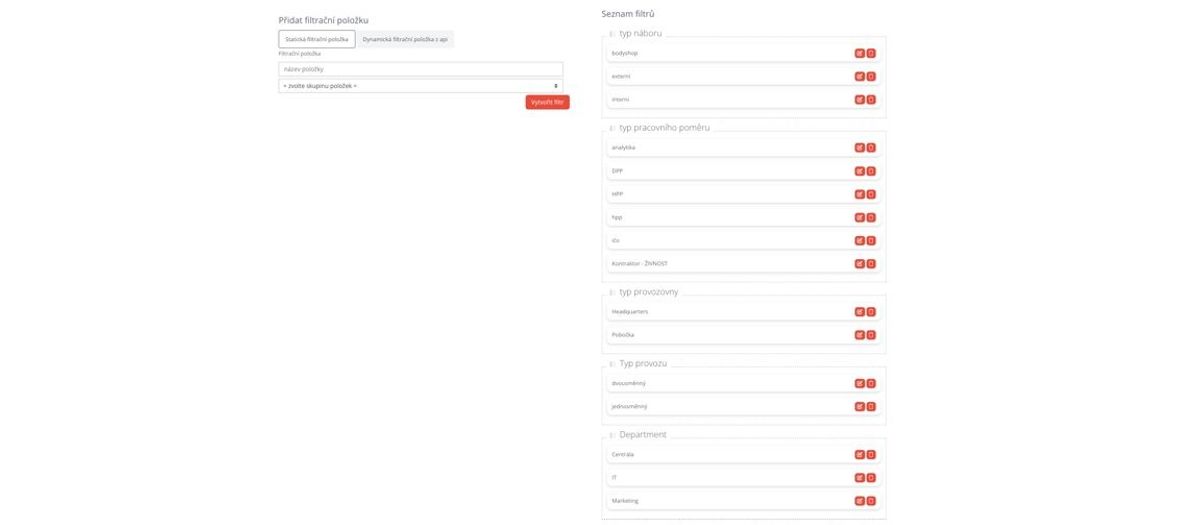
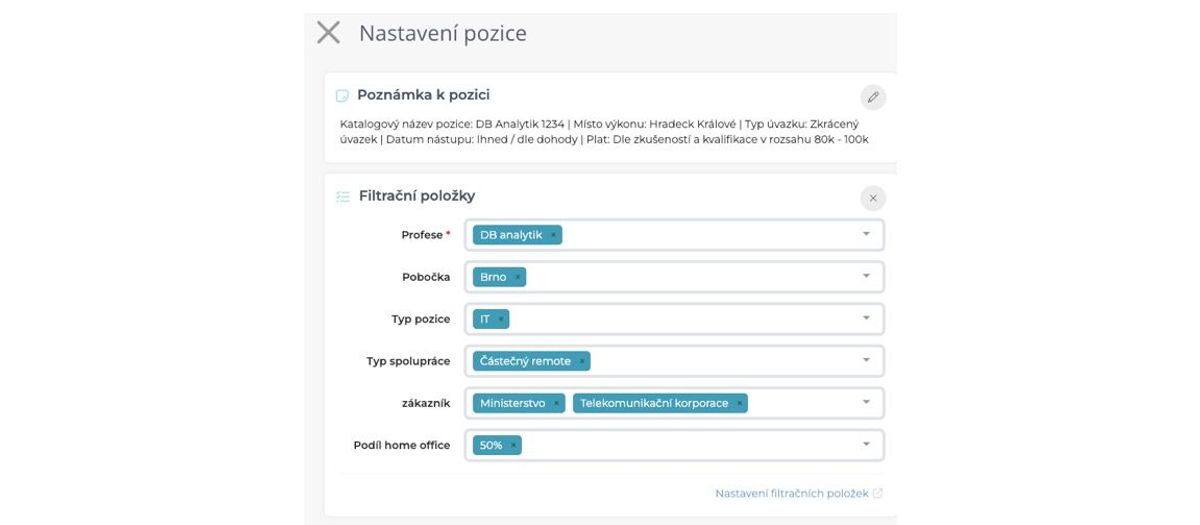
Filter items are essentially tags for positions. You can use them to mark individual positions according to categories that are important to you.
The big advantage is that you can set up item categories (sort of imaginary "folders") and their individual items completely according to your preferences and in unlimited quantities. Thanks to this, filter items can be used to solve a whole range of your specific business processes, for which you would otherwise have to order and pay for custom development like "Can you please add a field for department type with our three options...".
Filter items have other properties that add additional possibilities to their use:
- Filter items can be set as mandatory (meaning a position cannot be published without filling them in).
- Filter items can also be loaded dynamically via API endpoints in addition to manual definition (link to documentation description).
- For filter items, you can define whether only one or more values can be selected.
You can learn about filter item settings in general in this article.
Areas where filter items can be used
In general, filter items can be used in these areas of ATS Recruitis:
- Position classification ("tagging")
- Items can be used to tag what type of position it is.
- Typically, e.g., what type of employment, type of establishment, which department, etc.), what technology, etc.
- Position filtering in position overview
- Based on filter item marking, positions can then be filtered in the position listing within the ATS.
- So, e.g., show me only positions from headquarters, show me only IT positions, show me all junior positions, etc.
- Items can also be combined in filtering.
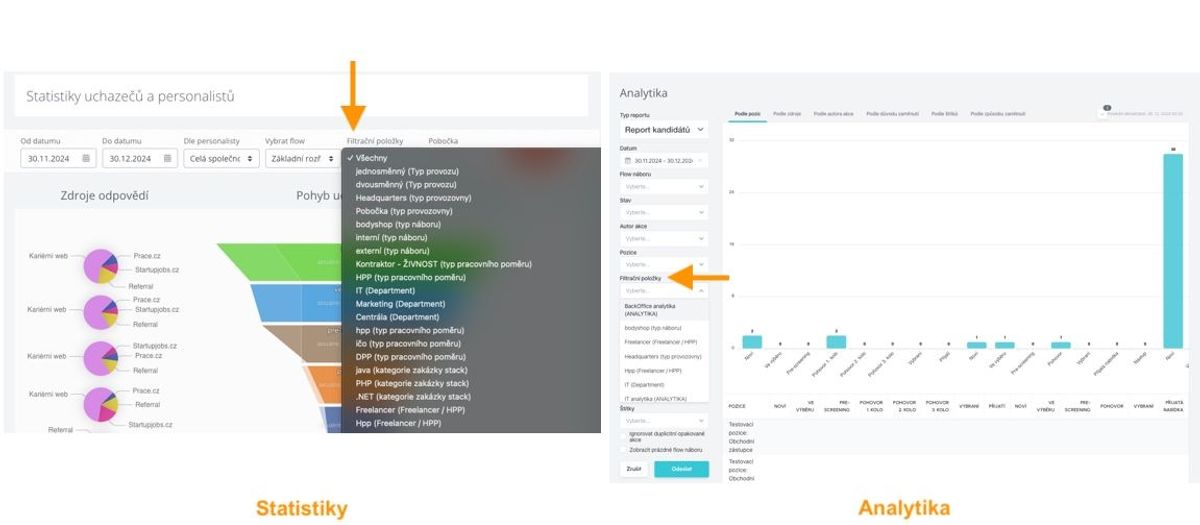
- Filtering within statistics and analytics
- Within statistics, you can filter by filter items, so you can create categories that help when creating reports.
- Typically, e.g., by department (only IT recruitments), establishment (e.g., recruitments to headquarters), manager (only recruitments for Jan Novak), positions with/without referral program, etc.
- Candidate classification within talent database
- An important property of filter items is that if a position has a certain filter item, it is then inherited by all candidates who applied for the position.
- So you can search in the database, e.g., for all candidates who have applied for junior marketing positions in the past, etc.
- Data transfer and classification for career page needs (via API)
- Filter items are also transferred in data within the API.
- This can be used when creating career pages based on API, for example, to control job listing content (icons for displaying benefits, technologies, etc.), displaying positions with referral program, prioritizing certain positions, etc.
- Position filtering within career pages (within iframe)
- If you use iframe for position integration into career pages, you can use filter items to offer candidates better filtering options instead of basic iframe filtering.
- So you can, e.g., offer filtering by home-office ratio, position classification by your specific departments, positions suitable for students, etc.
Practical examples of using filter items
Custom work field settings
- In case the standard field and position settings don't suit you (which are such due to compatibility with various job portals for multi-posting), you can set up your own set of fields that suits your needs exactly.
- This can be done if you only publish from ATS Recruitis to career pages or similar sources that don't need to be matched with standard field and position code lists for job portals - in other words, if you wanted to publish to job portals like JenPrace, Jobs, etc., field and position matching would not work.

Data items for controlling career pages
- In case you want to control certain graphic elements on career pages (e.g., icons with fields, marking positions with referral program, marking "top" positions, etc.), you can use filter items.
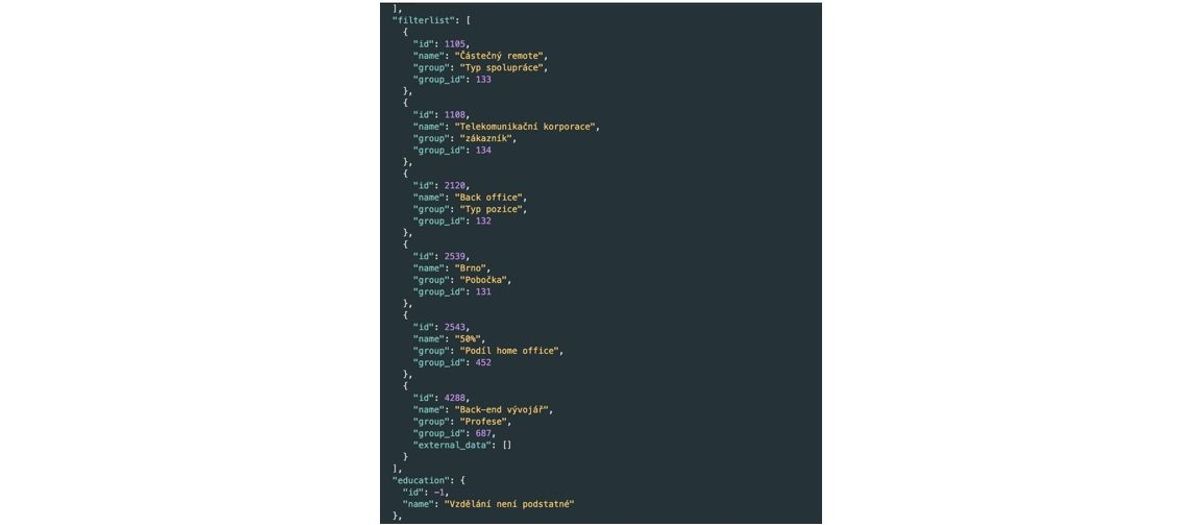
- Filter items for positions are transferred via API in a separate "filterlist" section, and using them, your career page developers can then control the display of graphic elements for individual positions, add filtering, etc.
Separating positions of two entities within career pages
- In case you manage multiple entities within one ATS Recruitis license (whether legal entities or branches in different countries) and want to clearly separate positions for different career pages, you can also use filter items.
- Ideally, if you create a mandatory filter item that allows selecting only one value, you thus ensure that each position will be displayed on exactly one career page (of course, if one position can be on multiple career pages, i.e., for multiple entities, you need to choose to allow selecting more than one item in that category).
- Your career page developers can then easily select positions belonging to the first entity's pages, positions for the second entity's pages, etc., based on this filter item.
Position and candidate classification for reporting needs
- Within reporting (both basic statistics and advanced analytics), you can filter by filter items.
- So you can select with one click a set of positions and their candidates that you want to include in reporting (e.g., recruitments at headquarters vs. at branches, back-office position recruitments, senior position recruitments, positions with full-remote option, etc.) and compare their parameters such as recruitment speed, source quality, rejection reasons, etc.
Related articles
Webhooks for the Nelisa portal
Let ATS Recruitis automatically download your candidates from the Nelisa portal.
Impersonation
Combining the answers of a historically depersonalized candidate with a new answer.
Talent database and its possibilities
The talent database does not have to be used only for searching contacts for candidates.