New Talent Pool [beta]
In Recruitis ATS, we've prepared a new look for the talent pool, which you can already preview using the switch in the Candidates menu. This is part of a global redesign of the entire application, based on the look you already know from the new candidate profile, job detail, and job listing pages.
This version is currently in beta, meaning it doesn't yet include every feature, but it's fully usable for everyday work. We'd love for you to try out the new design and share your feedback with us. We're continuously incorporating your input, and once everything has been addressed, we'll switch to the new design permanently. We'll of course let you know in advance via newsletter and in-app notifications before that happens.
How to switch to the new design?
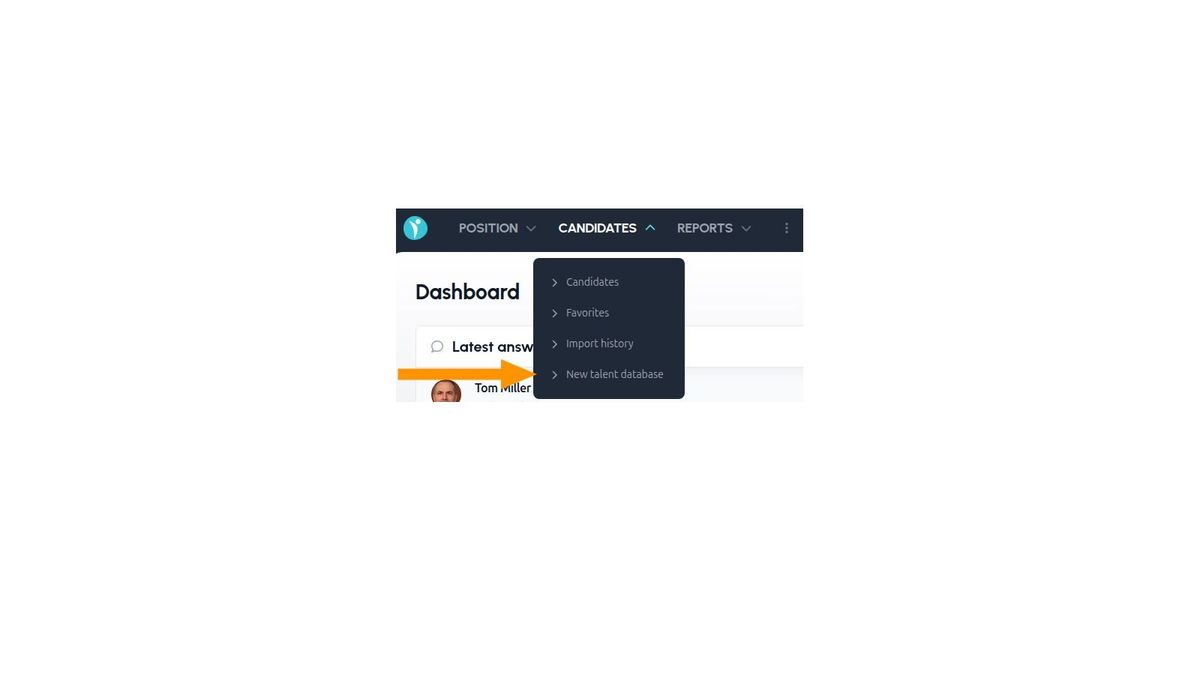
In the Candidates menu, you'll find the "New candidate database" item, which switches you to the new look.
If you click only on the main Candidates menu or select the Candidates item within it, you'll still see the old version of the talent pool for now.
What else is new besides the look?
The look, controls, and general operating principles of the talent pool have been aligned with the new job detail design, so from a user's perspective, working with candidates will now be consistent in both places.
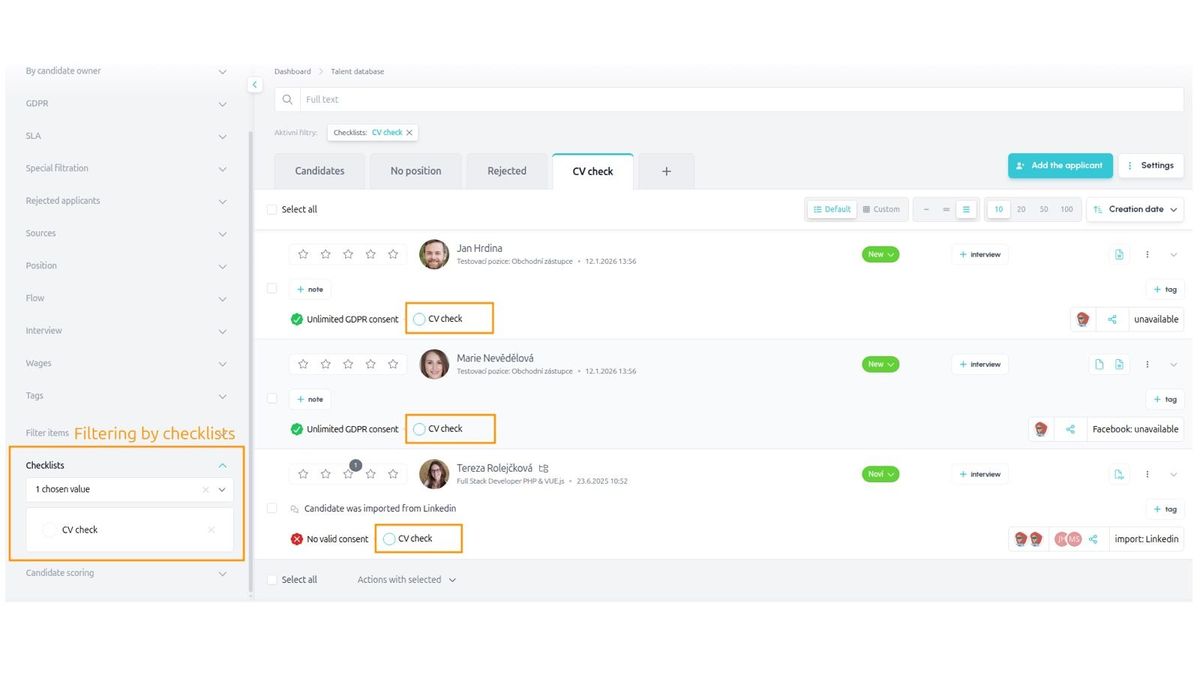
Beyond the visual redesign, there are several major new features and improvements based on your feedback from using the current talent pool. These are the key changes:
- You can now create your own dynamic micro-pools
- You create a micro-pool based on the search results of a chosen filter, which you can save permanently as a bookmark above the talent pool
- Candidates in micro-pools are added and removed dynamically depending on whether they meet the criteria of the saved filter
- You can keep bookmarks private, share them with selected colleagues, or share them with the whole company
- You can create an unlimited number of bookmarks, and therefore micro-pools
- You can set a chosen custom bookmark as the default view for the talent pool
- Filtering options have been expanded to include:
- Checklists, including filtering by status (e.g., "Show me only candidates who haven't completed the CV Check checklist" or, conversely, "Show me only candidates who have completed the Schedule Interview checklist")
- Interview date and the calendar it's scheduled in
- Candidate scoring from stars/thumbs
- Whether the candidate is shared or not
- Positions, flow, and filter items have been split into separate sections
- You can switch between different row display types (the "density" of candidate detail displayed) from compact to detailed
- In addition to preset rows, you can create your own custom view of the data, where you set the columns and their order entirely yourself
- More bulk actions have been added, modeled on the job detail page. Bulk actions are now pinned to the bottom of the screen (so they're always visible without scrolling) and can be triggered with a single click from a clear pop-up menu
- You can sort candidates by several criteria: creation date, name, flow status, scheduled interview date, SLA, and candidate score
- You can collapse the filter panel on the left to free up more space on the page for candidate information
- A new tab has been added for candidates without a position
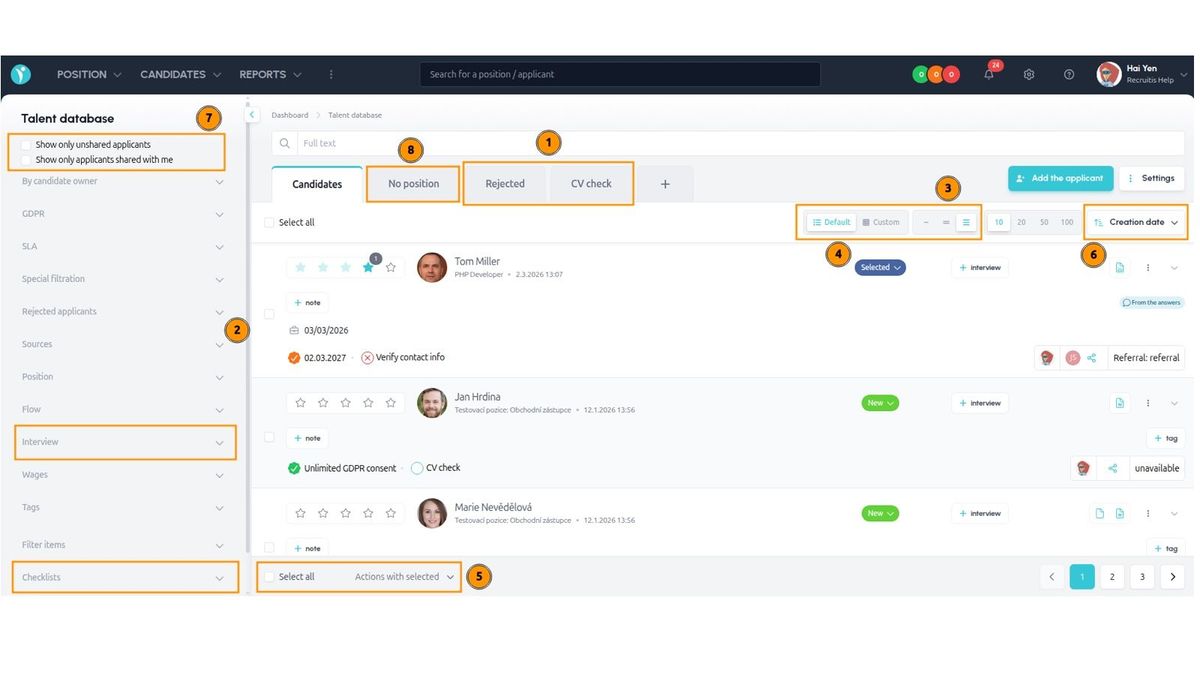
Example of checklist based filter:
Micro-pools
The strongest new feature is the ability to create micro-pools as bookmarks above the entire talent pool.
Thanks to the wide range of filtering options — from tags and flow statuses, through filter items, checklists, and SLA, all the way to full-text search — you can create a whole range of micro-pools, or "slices" of your talent pool, that help you organize your work with candidates more efficiently across positions, remind you of candidates who require a specific action, sort candidates by certain criteria, and more.
Here are a few practical examples of micro-pools:
- Candidates waiting for the "Schedule Interview" action, based on a checklist
- Candidates who know Java and speak German, based on tags
- Candidates in the "Offer Sent" flow status, based on flow
- Candidates who applied to positions at company headquarters, based on a filter item
- Candidates with an orange or red SLA, based on SLA
- Rejected candidates who scored 4 or 5 stars and had a salary expectation below 2,500 EUR, based on scoring and salary expectation
- Hired candidates who came from the referral source, based on source and hired status, across all recruitment flows
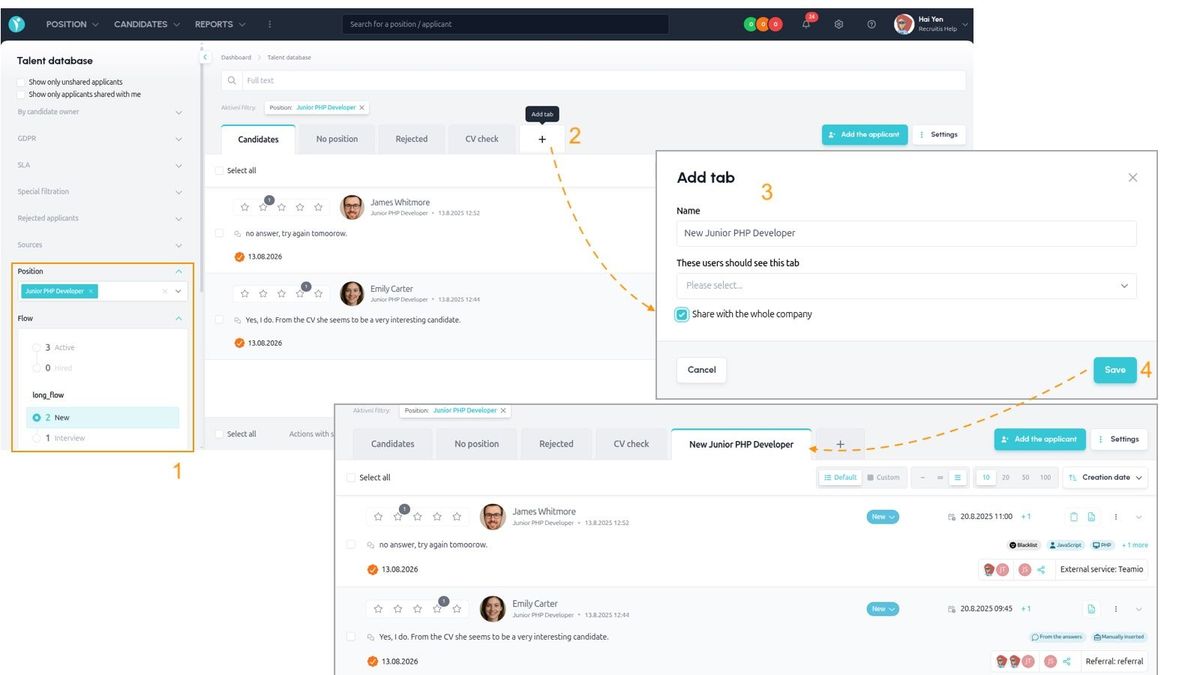
How to create a micro-pool?
- Set your filters so the data shows the candidates you're looking for
- For example, say I want candidates who are in the "Interview" status, have completed the "Interview Held" checklist, but haven't completed the "Fill In Interview Card" checklist — in other words, this will be my micro-pool showing candidates for whom I currently need to fill in the interview card.
- Click the "+" button to the right of the last tab above the candidate list
- Set the bookmark's parameters — mainly the name, and whether you want to share this bookmark with anyone (with individual colleagues or the whole company)
- After clicking the Save button, the new bookmark is added, and candidates in it are automatically added and removed depending on whether they match the results of your saved search
The image below illustrates this:
Related articles
Webhooks for the Nelisa portal
Let ATS Recruitis automatically download your candidates from the Nelisa portal.
Impersonation
Combining the answers of a historically depersonalized candidate with a new answer.
Talent database and its possibilities
The talent database does not have to be used only for searching contacts for candidates.