Pin CV to your screen
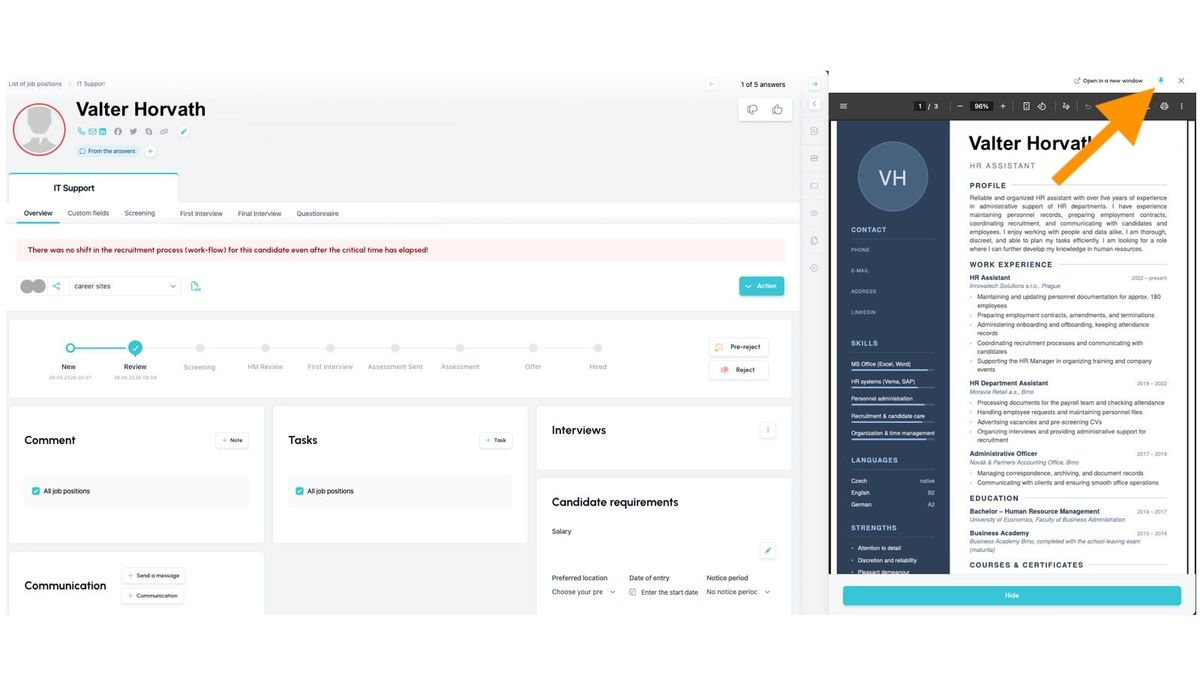
Reviewing a CV no longer interrupts your workflow. The CV now pins to the right-hand side of your screen the moment you open it and stays in view at all times – while you move freely around the candidate card, write notes, complete checklists, or create tasks. Everything you need is right there, side by side, with no more switching between windows.
How it works
After opening a CV, you can pin the file to the right side of the screen using the "pin." The candidate card stays fully functional – you can scroll through it and work with it as usual, while the CV remains visible. If you no longer need the pin, remove it by clicking the pin icon in the top-right corner of the preview.
💡 The system remembers your setting, so if you want every CV you open to be pinned, you only need to do it once.
Related articles
Webhooks for the Nelisa portal
Let ATS Recruitis automatically download your candidates from the Nelisa portal.
Impersonation
Combining the answers of a historically depersonalized candidate with a new answer.
Talent database and its possibilities
The talent database does not have to be used only for searching contacts for candidates.