Candidate Card
What is the candidate card for?
The candidate card serves as a central place for all information about the applicant - their personal data, communication history, and an overview of all positions they have applied for.
You can open it from multiple places: from the talent database, position detail, dashboard, or notifications.
The card consists of three main parts:
- Basic information - name, contacts, rating, tags.
- Personal data and documents - editable personal data, GDPR data, custom fields, attachments, and sources.
- Position information - detailed information for individual positions organized into tabs.
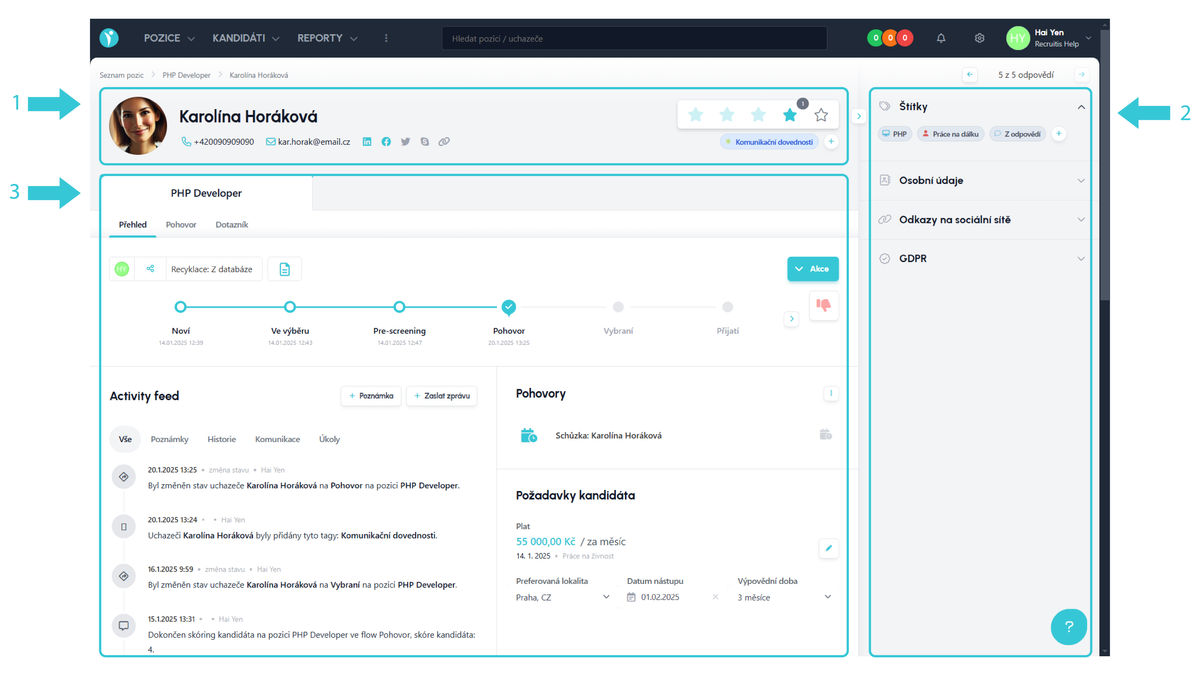
Here you will find 3 default tabs:
Overview
Contains recruitment status, files, notes and tasks, interview information, candidate requirements, activity feed with complete chronology of action history and communication, and an Actions button for all available actions.
Depending on system settings, there may also be check-lists, NPS, rejection reasons, or salary requirements here.
Interview
Used for saving interview notes. The number of tabs corresponds to the number of recruitment process states that have an interview action assigned.
Records are saved separately for each user, so you can easily compare colleagues' evaluations.
Note: Old notes can be found under the user "Evaluation without user". More in the article Interview notes - transition between old and new card.
Questionnaire
Used for creating and sending online questionnaires within selected states or ad-hoc.
Due to additional system settings, there may be more tabs (another typical tab can also be so-called custom fields).
Good to know
-
The URL contains the response ID (
/answer/detail/1234567) or candidate ID (/candidate/detail/1234567), which you will use when communicating with support. -
The top navigation allows you to switch between positions and candidates for a given position.
-
Tabs with positions are sorted from newest application to oldest.
-
The card layout may change depending on screen size.
-
The "Remove from position" action deletes the candidate's application and the corresponding tab.
-
The card has two views: full page, or right-panel. The right-panel is practical because it leaves the original page in the background and you can easily return back.
Links to related articles:
Video demonstration
In this video, you will see a basic overview of how the new candidate card is logically structured, how information is organized on it, and what fundamental improvements it brings compared to the old card.
Related articles
Webhooks for the Nelisa portal
Let ATS Recruitis automatically download your candidates from the Nelisa portal.
Graphics and system appearance
Basic settings of graphic elements - logos and background.
Position editor settings
Select the optional items in the position editor that you want to display.