Interview Notes - Transition Between Old and New Card

In the new candidate card design, the principle of saving interview notes has changed (this refers to the entire interview card - interview notes, criteria-based evaluation, and predefined questions).

Notes are now saved for each user by name, so it no longer happens that everyone writes "anonymously" into one box, where they could overwrite or delete each other's notes, and it was impossible to compare opinions of multiple colleagues.

This transition will inevitably create situations where some notes were made the old way (without a specific author), some the new way (with a specific author), and for some candidates it may be a combination if some users enabled a different candidate card display mode than the rest of the company.

We've thought of all these scenarios, and here's an overview of how the individual combinations are resolved and how you'll see the notes.

Examples of individual scenarios:

You made notes on the old card:

  • Old card - notes remain as they are

  • New card - they appear under the user "Notes from the old candidate card," they are not displayed in the respective fields on the new card because only your own notes and answers are displayed there.
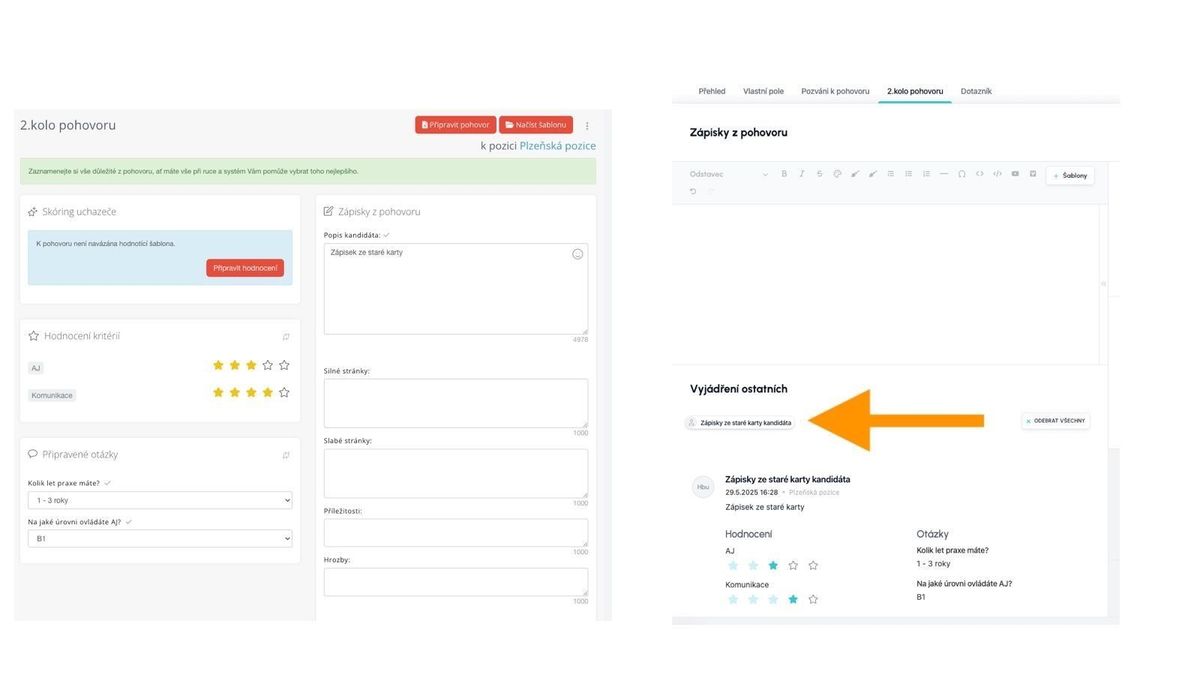
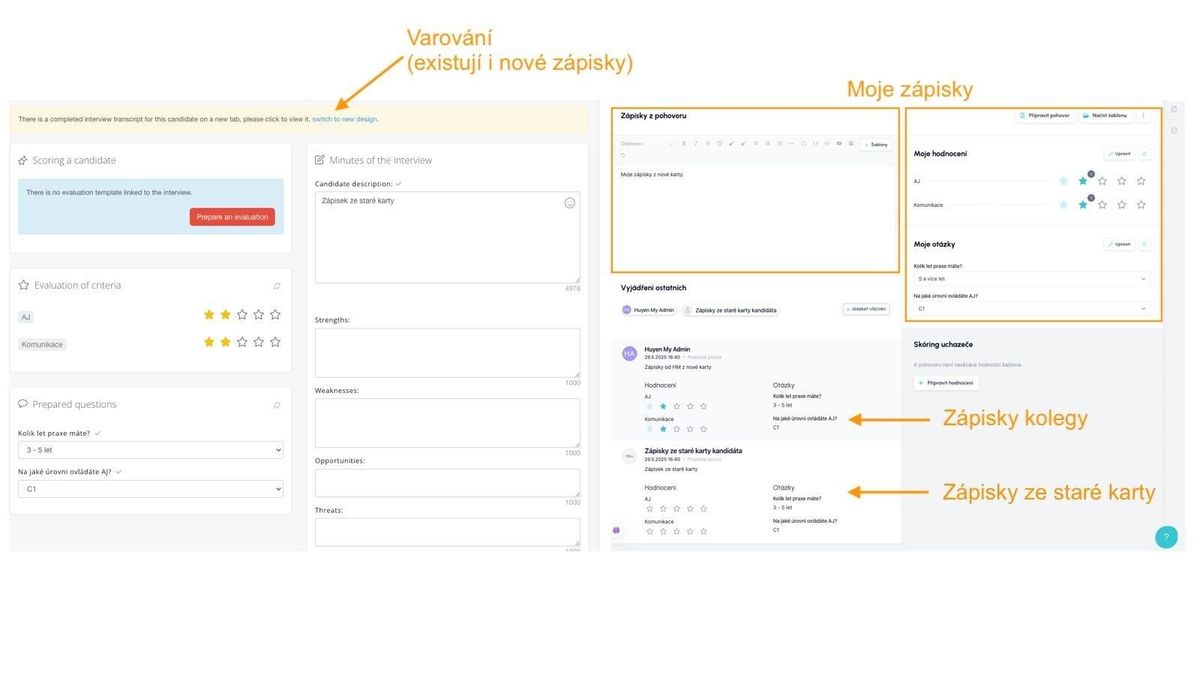
You made notes on the new card:

  • Old card - only values written the old way are displayed, but if a record from the new card also exists, a warning with a link to the new version of the card appears

  • New card - in the sections "Interview Notes," "My Evaluation," and "My Questions," values written by you personally on the new card are shown; records from colleagues are shown if you expand them in the "Others' Feedback" section
ATS Recruitis Features SLA ReportRejection ReasonsGoogle Chrome PluginExternal Sharing of Candidate CardsOption to track phone rejection rateFilling in Candidate Personal Data Directly from CVCompany Pages for Internal Positions within ATS RecruitisCustom HTML Job Offer TemplatesNotifications About New Candidates Including Manually Added OnesPhone calls via mobile app from desktopTwo-Factor AuthenticationMultiple Entities Within One LicenseAnalytics - Requests ReportVideo Link in Position Editor"Position Settings" MenuOption to Disable Adding Smart Email to Copy of Messages to CandidatesConnecting the Volnamista.cz Publication ChannelAutomated Sharing and Tagging of CandidatesOption to Choose NPS SenderAnalytics - Candidates ReportGoogle Chrome Plugin for StartupJobs PortalAdding a Map to Email TemplateScrolling the Notes WindowDynamic Loading of Filter Items via APIRepeated Candidate Response to the Same PositionEmail Template ManagementCustom HTML Email TemplateForcing Response Form LanguageCalendar (Redesign)Notifications About Emails Sent Only to System EmailFiltering Positions by Ownership and SharingReporting Custom Field ValuesWorking with interview invitationsGoogle Chrome Plugin for Profesia PortalMicro-pools in the Candidate DatabaseEmail Sending Dialog (Redesign)Tag CategoriesCandidate Rejection ReasonsAssigning TasksNew Candidate Card (Redesign) - Beta Version SwitchWork Fields and Professions as Optional Field for PositionInternal NPSAnalytics - Custom Fields ReportRequest ApprovalMoving Accepted Candidates Outside ActiveFilter Items - Practical Usage ExamplesCandidate CardRecruitment FlowPositionCandidate Actions - Copying and Moving Candidates to PositionWorking with TagsWorking with AttachmentsTask OverviewCompleting TasksTasksActivity FeedCreating a PositionPosition Settings MenuPosition PublicationInterview Notes - Transition Between Old and New CardGoogle Chrome Plugin for LinkedIn Message SynchronizationGoogle Chrome Plugin for Loading Gmail MessagesAI for Creating Job Ad TextsIntegration with Profesia Portal via WebhookCandidate Offer FormUser RolesIntegration with Indeed PortalSwitching Between Multiple Accounts in ATS RecruitisReferral with Obtaining Recommended Candidate ConsentAnalytics - Introduction to BI ModuleDashboard on the Main PageAI for Job Ad Competitiveness ComparisonMessage Sending DialogRequisitions - HTML Editor and TemplatesPre-rejectionCommunication Record with CandidateCandidate Responses in One PlaceInterview PlanningQuestions from Truly Good CandidatesWorking with Hiring ManagersInterview QuestionsSetting and Monitoring FeedbackFiltering Candidates in Database by SourceHot CandidatesGender Variable in Email TemplatesOnline Interviews Directly from RecruitisAnalytics - Positions ReportBulk TaggingGoogle Chrome Plugin for LinkedInQuick Interview PlanningGDPR Changes in the SystemCandidate ComparisonIntegration of New Responses from StartupJobsIntegration with Slack.comIntegration with CzechCrunch JobsCustom Response FormsNotifications About All Notes on Your PositionsVariable Recruitment Process PhasesAnalytics - Conversion ReportInterview overview - Meetings menu

Related articles

23. 05. 2023

SLA Report

In addition to measuring SLA directly on the ATS Recruitis homepage, you can have a report generated via email.

14. 05. 2025

Rejection Reasons

When rejecting a candidate, you can record the reason for rejection, which is automatically reflected in your statistics and reports, and also serves as a tool for searching candidates in the database. This allows the reasons to be best tailored to your needs.

04. 05. 2022

Google Chrome Plugin

A plugin enabling saving candidates from LinkedIn and several other portals.