Why the New Design Is Amazing

Every change is challenging and brings with it a certain degree of uncertainty — especially when it comes to your key recruitment software, which an ATS undoubtedly is. With the current updates, however, we dare to claim that although these are fundamental changes in fundamental places within the application (in fact, the most-used ones), the temporary user discomfort of adapting to the new look is far outweighed by a set of new features.

The common denominator of the biggest improvements is flexibility. Our goal is to let you customize the system to your needs as much as possible — our solution is used by recruiters ranging from small start-ups to huge corporations, and one universal setup can't suit everyone.

The second key motivation is to make work easier, especially in places where it used to be necessary to switch back and forth between the job list, the job detail, and then the candidate profile; to hunt for items you use every day in the job's action menu; and where search results in the Talent Pool couldn't be saved, etc.


So what will you love the most?

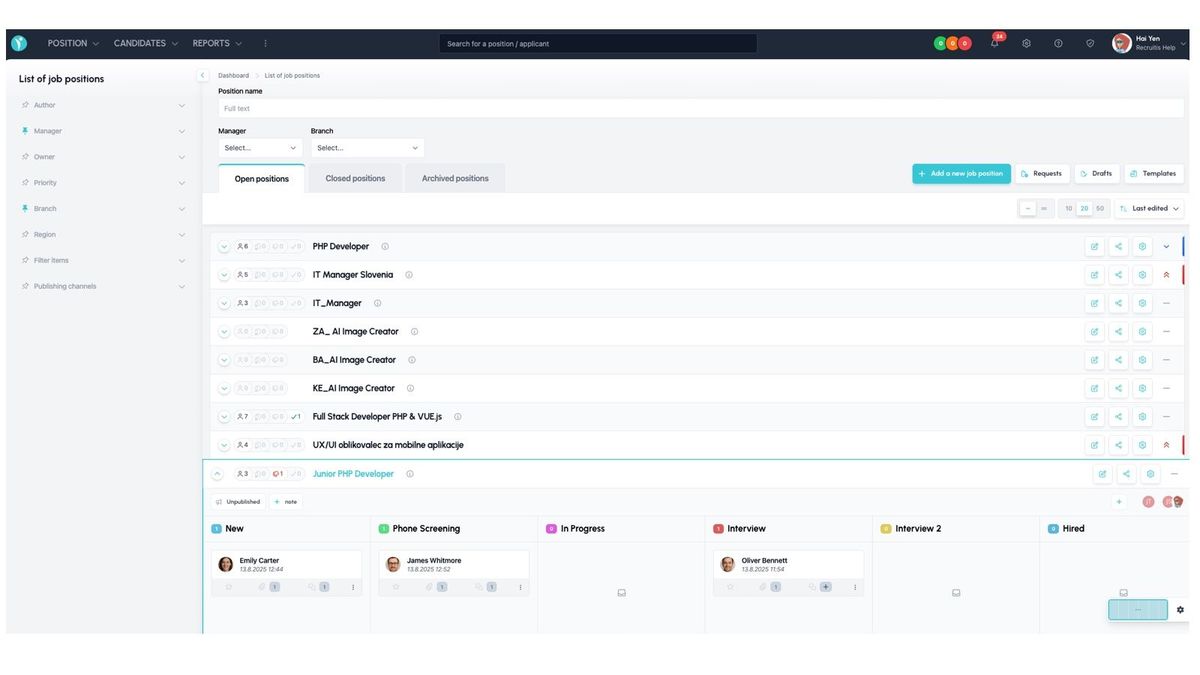
Job List


  • Kanban board for processing candidates directly in the list
  • Ability to save frequently used job actions as action buttons
  • Two list views: compact (single-line) and detailed
  • Ability to save favorite filters
  • The last used filter is remembered
  • Full-text search for jobs

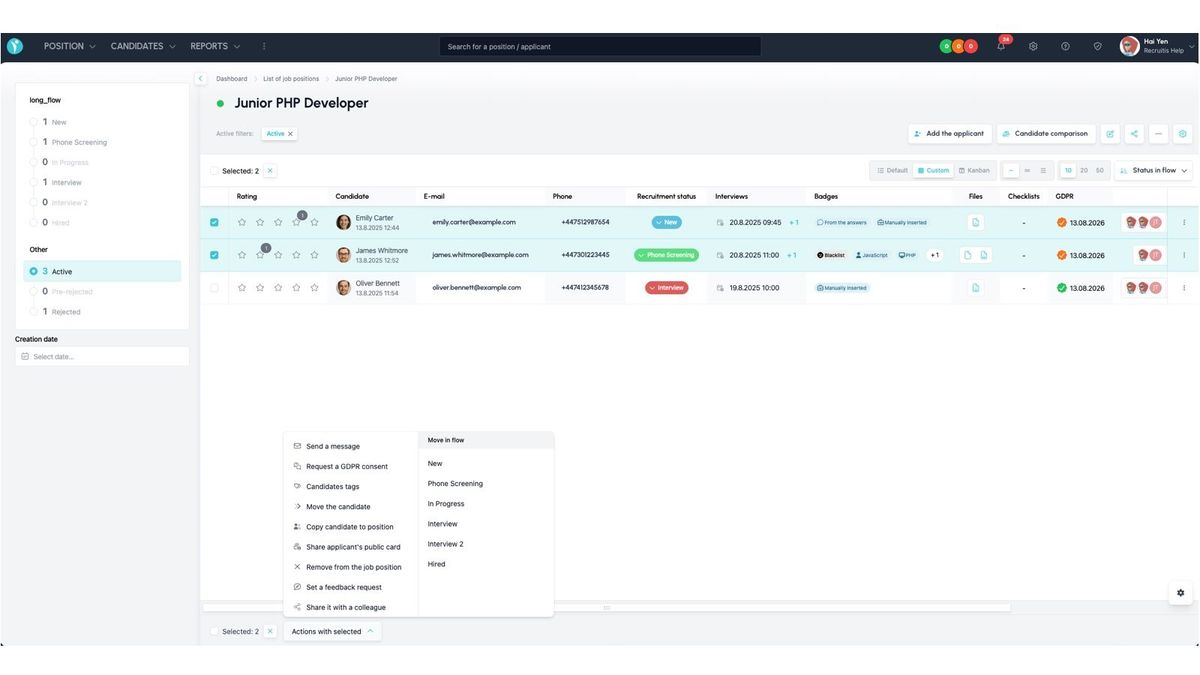
Job Detail


  • Three default candidate list display settings, from compact to detailed
  • Ability to create a custom data view — choose which candidate columns to show and their order
  • Job Detail inherits action buttons from the Job List with frequently used job actions
  • Candidate comparison is available directly as an action button on the job
  • Bulk actions have a clearer layout and are performed with a single click
  • An indicator in the candidate list shows applications to multiple jobs
  • More actions can be performed directly from the candidate list, including completing checklists, managing tags, and the entire action menu from the candidate profile
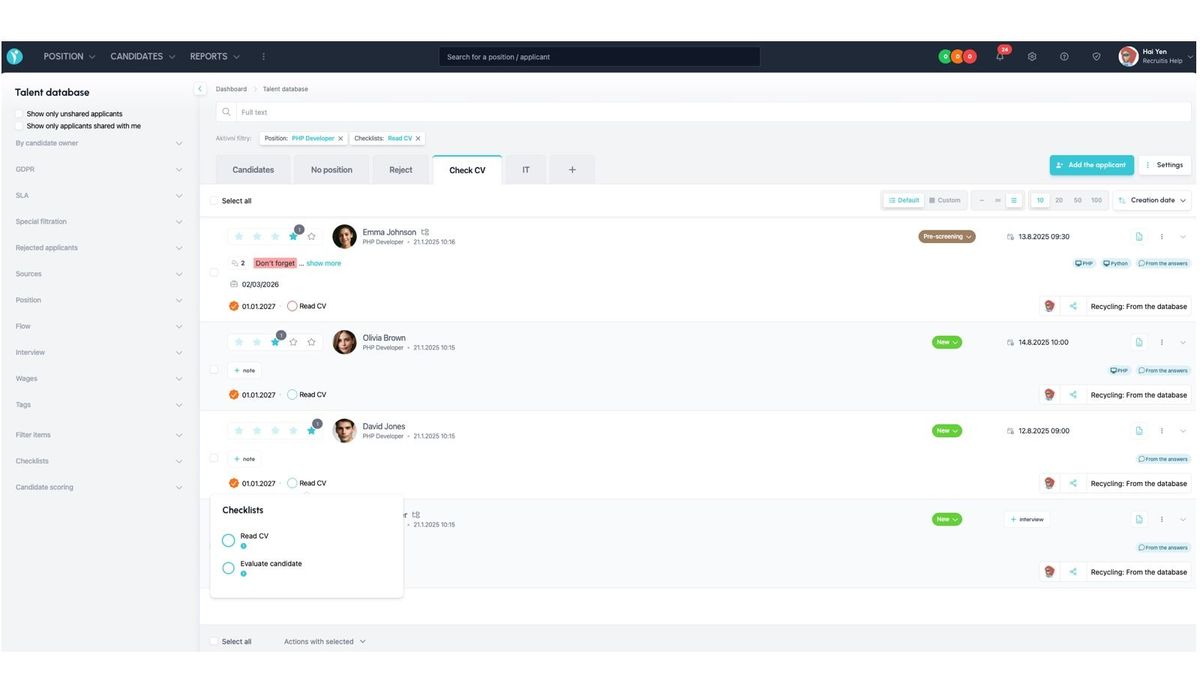
Talent Pool


  • You can save search results as so-called micro-pools, shown as tabs above the Talent Pool
  • The candidate list view is just as flexible as in Job Detail — you can choose the level of detail and define your own custom view of the candidate table
  • New search options have been added, including checklist statuses, interview dates, and candidate sharing
  • Bulk action options have been expanded to match those in Job Detail
  • The overall look and usage logic of the Talent Pool are now unified with Job Detail, so you can work the same way in both places
  • Candidates without a job have their own system tab
💡 You can learn more about each feature directly in the articles describing the design change:


ATS Recruitis Features SLA ReportRejection ReasonsGoogle Chrome PluginExternal Sharing of Candidate CardsOption to track phone rejection rateFilling in Candidate Personal Data Directly from CVCompany Pages for Internal Positions within ATS RecruitisCustom HTML Job Offer TemplatesNotifications About New Candidates Including Manually Added OnesPhone calls via mobile app from desktopTwo-Factor AuthenticationMultiple Entities Within One LicenseAnalytics - Requests ReportVideo Link in Position Editor"Position Settings" MenuOption to Disable Adding Smart Email to Copy of Messages to CandidatesConnecting the Volnamista.cz Publication ChannelAutomated Sharing and Tagging of CandidatesOption to Choose NPS SenderAnalytics - Candidates ReportGoogle Chrome Plugin for StartupJobs PortalAdding a Map to Email TemplateScrolling the Notes WindowDynamic Loading of Filter Items via APIRepeated Candidate Response to the Same PositionEmail Template ManagementCustom HTML Email TemplateForcing Response Form LanguageCalendar (Redesign)Notifications About Emails Sent Only to System EmailFiltering Positions by Ownership and SharingReporting Custom Field ValuesWorking with interview invitationsGoogle Chrome Plugin for Profesia PortalMicro-pools in the Candidate DatabaseEmail Sending Dialog (Redesign)Tag CategoriesCandidate Rejection ReasonsAssigning TasksNew Candidate Card (Redesign) - Beta Version SwitchWork Fields and Professions as Optional Field for PositionInternal NPSAnalytics - Custom Fields ReportRequest ApprovalMoving Accepted Candidates Outside ActiveFilter Items - Practical Usage ExamplesCandidate CardRecruitment FlowPositionCandidate Actions - Copying and Moving Candidates to PositionWorking with TagsWorking with AttachmentsTask OverviewCompleting TasksTasksActivity FeedCreating a PositionPosition Settings MenuPosition PublicationInterview Notes - Transition Between Old and New CardGoogle Chrome Plugin for LinkedIn Message SynchronizationGoogle Chrome Plugin for Loading Gmail MessagesAI for Creating Job Ad TextsIntegration with Profesia Portal via WebhookCandidate Offer FormUser RolesIntegration with Indeed PortalSwitching Between Multiple Accounts in ATS RecruitisReferral with Obtaining Recommended Candidate ConsentAnalytics - Introduction to BI ModuleDashboard on the Main PageAI for Job Ad Competitiveness ComparisonMessage Sending DialogRequisitions - HTML Editor and TemplatesPre-rejectionCommunication Record with CandidateCandidate Responses in One PlaceInterview PlanningQuestions from Truly Good CandidatesWorking with Hiring ManagersInterview QuestionsSetting and Monitoring FeedbackFiltering Candidates in Database by SourceHot CandidatesGender Variable in Email TemplatesOnline Interviews Directly from RecruitisAnalytics - Positions ReportBulk TaggingGoogle Chrome Plugin for LinkedInQuick Interview PlanningGDPR Changes in the SystemCandidate ComparisonIntegration of New Responses from StartupJobsIntegration with Slack.comIntegration with CzechCrunch JobsCustom Response FormsNotifications About All Notes on Your PositionsVariable Recruitment Process PhasesAnalytics - Conversion ReportInterview overview - Meetings menu

Related articles

23. 05. 2023

SLA Report

In addition to measuring SLA directly on the ATS Recruitis homepage, you can have a report generated via email.

14. 05. 2025

Rejection Reasons

When rejecting a candidate, you can record the reason for rejection, which is automatically reflected in your statistics and reports, and also serves as a tool for searching candidates in the database. This allows the reasons to be best tailored to your needs.

04. 05. 2022

Google Chrome Plugin

A plugin enabling saving candidates from LinkedIn and several other portals.