New look of the NPS report page

Help Recruitis · Updated

The NPS report page has been redesigned and now uses the same modern look you already know from other parts of the Recruitis ATS that have been gradually migrated to the new application design.

Filtering and customizing your view

Filtering the report is now clearer thanks to a collapsible left panel, which you can open or hide as needed to give yourself more room for the data itself. You can also pin the filters you use most often directly into the main part of the report – so you no longer have to click into the side panel every time, and your key filters stay right at hand.

A handy new feature is that the currently applied filter settings are automatically saved in the URL. Simply copy the link and send it to your colleagues – they'll see the exact same report with the same filters applied, without having to set anything up themselves. This comes in handy, for example, when sharing results with management or discussing a specific data segment with your team.

Clearer metric display

We've redesigned the individual metrics shown on the page into a new, visually cleaner layout that's easier to read at a glance. The metrics themselves remain unchanged in content – this is purely a visual improvement, not a new feature.

New chart for ratings by flow stage

The biggest change concerns the chart showing the distribution of ratings across individual stages of the flow. Instead of the previous vertical layout, the report now features a horizontal bar chart. This change is more than just cosmetic – the horizontal orientation gives each value and stage significantly more visual space, making it easier to compare ratios between stages and quickly spot where respondent ratings vary the most across the flow.


The rest of the report's content remains functionally identical – this update is primarily about modernizing the look and making the data easier to work with, rather than introducing major functional changes.
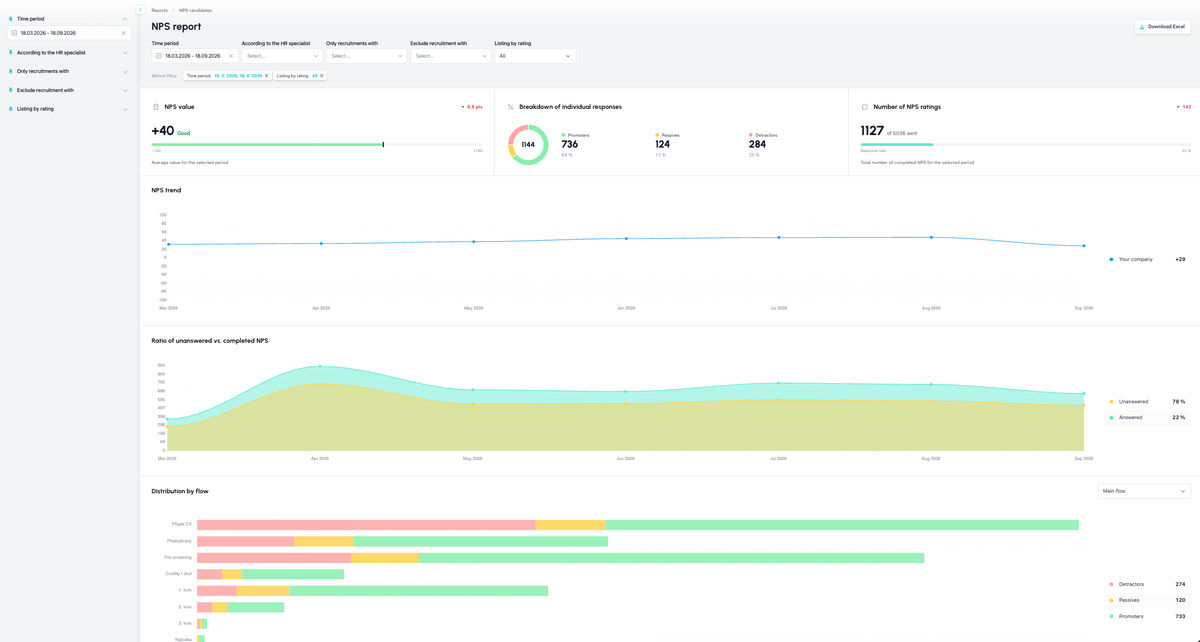
Which metrics you'll find in the NPS report

  • The NPS value for the currently filtered period
  • The ratio of response types (promoters, passives, detractors) for the currently filtered period
  • The number and ratio of sent and completed NPS for the currently filtered period
  • NPS trend over the last 6 months
  • Trend of the ratio of completed vs. uncompleted NPS over the last 6 months
  • Distribution of response types (promoters, passives, detractors) within the selected recruitment flow
  • A list of individual NPS responses

What filtering you can use

  • Time period - based on the date the NPS was sent
  • By owner, i.e. by the owner of the given NPS (an NPS is owned by everyone who has direct ownership of that candidate)
  • Only recruitments involving a specific colleague
  • Only recruitments where the selected colleague is conversely not involved
  • By rating type (promoters, passives, detractors)
  • The list of ratings can be filtered by whether they have a rating and a comment

💡 The filtering at the top of the page affects all the charts and metrics shown below.

ATS Recruitis Features Webhooks for the Nelisa portalImpersonationTalent database and its possibilitiesAccount line manager vs. account with limited rightsKanbanManage profile photosProcessing the candidate list in the database (alternative to exporting candidate contacts)Connection of personnel advertising on the Linkedin network with ATS RecruitisCopying and moving a candidatePrinciples of functioning of the candidate cardRecruitment flow and connection with email templatesUpload a response from a LinkedIn adClearing the image cache when sharing a position on LinkedInAdjusted dialogs for copying and moving a candidateSave the interview question templateScheduling a candidate interview right in your calendarAd response source vs. candidate resourceCandidate Service Prioritization (SLA)Management of communication regarding the rejection of applicantsNew GDPR filters in the databaseReports and statisticsGDPR consentsRecovering a deleted user accountReferralUser managementMulti-brand in email communication with candidatesFilters in position listsNPS metricApplicant import historyPractical example: candidate deletion vs. removing the answerForeign advertisementsLogin to the mobile application using a QR codeOffers to candidates (offer management)Attachments of the applicantConfidential job positionCustom fieldPlace of workPreferred locationWebhooks for system eventsRenaming the candidateTagging notesOption to cancel sending NPSExpedited position publicationApplication for opening a position ("requests")SMTP settings for sending emailsElimination of the applicantWho has access to the candidate cardAutomatic responseClassified ads and ad templatesSending SMS from ATS Recruitis RecruitisBulk actionsTo cancel a delayed email sendPosition sharing opportunities through ATS Recruitis' internal career siteConnection with the fajn-brigády.cz portalWithdrawal of consent to the processing of personal dataA reminder to take action with the candidatePublications to the profession portal via APISend emails from Recruitis using your Outlook365 accountThe function to remove candidates from a position directly in the talent databaseCalculation of the reaction time between each flow stateInterview scheduling by the candidate with evaluation of multiple calendarsScheduling an interview by a candidate with the possibility of multiple candidates on the same dateOption to select the interview date for the candidate Ability to create multiple internal ATS Recruitis calendarsAssigning a branch location from the JenPráce job portal codebookEmail delivery problems (undelivered emails or spam)Creating a Polish advertBackward shift in recruitment flowInserting images in the ad editorOption to disable SLA measurement for a specific positionFilter NPS statistics results by recruiterFilter NPS statistics results by recruiterAbility to approve a job offer by multiple approversFiltering in the database of candidates by start date and notice periodChecklistIntegration with the Slovenian Portal MojeDelo.comTimezones in calendarSLA ReportRejection ReasonsGoogle Chrome PluginExternal Sharing of Candidate CardsOption to track phone rejection rateFilling in Candidate Personal Data Directly from CVCompany Pages for Internal Positions within ATS RecruitisCustom HTML Job Offer TemplatesNotifications About New Candidates Including Manually Added OnesPhone calls via mobile app from desktopTwo-Factor AuthenticationMultiple Entities Within One LicenseAnalytics - Requests ReportVideo Link in Position Editor"Position Settings" MenuOption to Disable Adding Smart Email to Copy of Messages to CandidatesConnecting the Volnamista.cz Publication ChannelAutomated Sharing and Tagging of CandidatesOption to Choose NPS SenderAnalytics - Candidates ReportGoogle Chrome Plugin for StartupJobs PortalAdding a Map to Email TemplateScrolling the Notes WindowDynamic Loading of Filter Items via API

Related articles

15. 05. 2022

Webhooks for the Nelisa portal

Let ATS Recruitis automatically download your candidates from the Nelisa portal.

19. 05. 2022

Impersonation

Combining the answers of a historically depersonalized candidate with a new answer.

24. 05. 2022

Talent database and its possibilities

The talent database does not have to be used only for searching contacts for candidates.