Logging events in ATS Recruitis without connecting your calendar
Not every company can connect its company calendars to other tools. IT Security often doesn't allow full calendar synchronization. In other cases, sharing settings don't let recruiters see the calendars of all managers across the company.
In that case, you can't use the calendar in ATS Recruitis to schedule interviews or to check availability in booking links. But your meetings with candidates don't have to live only in Outlook...
Just add one extra email address to the invitation and the meeting shows up in ATS Recruitis too!
When this feature comes in handy
You'll appreciate this feature most when you schedule interviews in your external calendar, i.e. Outlook or Google Calendar, and at the same time want to see scheduled interviews and other meetings:
- on the candidate card, so the whole team knows what stage of communication the candidate is at,
- in the internal ATS Recruitis calendar,
- in reporting, for example in the meetings report.
How to log an event in ATS Recruitis
Every candidate in ATS Recruitis has their own system email. The system uses it to recognize which candidate the event belongs to.
- Open the candidate card in ATS Recruitis.
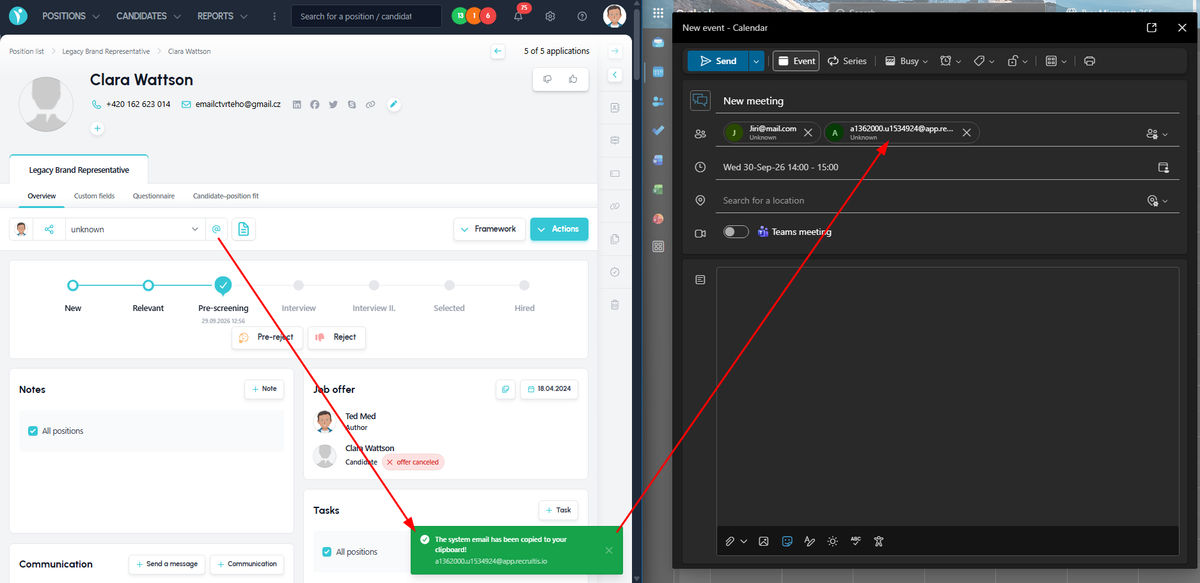
- Click the "@" icon next to the candidate source information. This copies the candidate's system email to your clipboard.
- Create an event in your Outlook or Google Calendar as usual.
- Paste the copied system email among the event attendees. Then add the other attendees, such as the candidate themselves or the hiring manager.
- Send the invitation.
What happens after you send the invitation
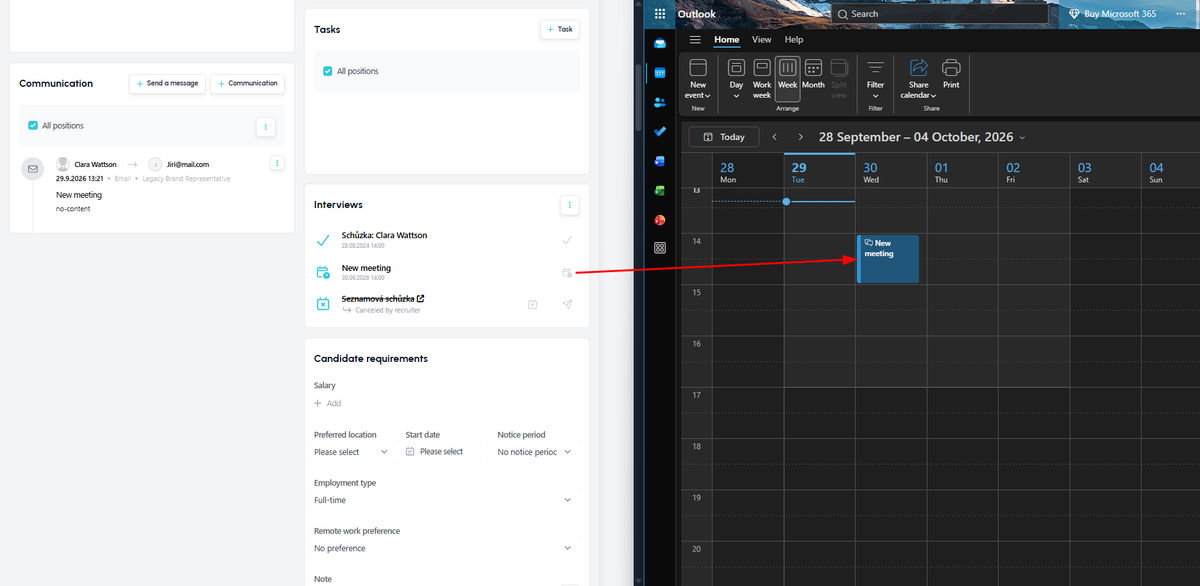
The event appears on the candidate card in ATS Recruitis. It is added to the internal calendar of the user whose email address the invitation was sent from.
This user must have access to the candidate card. If they don't, the event won't be created. This can happen, for example, with a hiring manager the candidate hasn't been shared with. So if managers send invitations too, make sure beforehand that the candidate is shared with them.
Logging is not synchronization
It's important to distinguish between two things here. This is not event synchronization like you get when you actually connect Outlook or Google Calendar to ATS Recruitis. It's a one-time copy of the event: ATS Recruitis receives the meeting details at the moment you send the invitation. Later changes in your external calendar won't be reflected in it.
In practice, this means:
- Attendance confirmation: When the candidate or invited managers accept the meeting in their calendar, ATS Recruitis won't know about it. Confirm the candidate's attendance manually using the button on the interview event in ATS Recruitis.
- Cancelling a meeting: If you cancel the meeting in your external calendar, it stays in ATS Recruitis. So update it manually there as well.
💡 Practical tips
- Make it a habit. If you add the candidate's system email to every invitation, you'll always have a complete meeting history on the candidate card.
- Think about reporting. Only logged events count towards the meetings report. That way you keep track of your team's activity even when you schedule outside ATS Recruitis.
- Keep the status up to date manually. Enter meeting confirmations and cancellations in ATS Recruitis as you go, so the data in the calendar and in reports matches reality.
- "Fight" for a full connection. If your IT Security allows it in the future, calendar synchronization will also give you automatic updates and availability checks in booking links.
Related articles
Webhooks for the Nelisa portal
Let ATS Recruitis automatically download your candidates from the Nelisa portal.
Impersonation
Combining the answers of a historically depersonalized candidate with a new answer.
Talent database and its possibilities
The talent database does not have to be used only for searching contacts for candidates.