Video questionnaires and application forms
A CV shows what a candidate can do on paper. A short video shows how they speak, how they think and whether they're really keen on the job.
With the new video questionnaires, you can ask candidates questions they answer by recording a short video. This is useful, for example, for sales roles when you want to hear their presentation skills, for customer support positions where the way they communicate matters, or for language-based roles where you can check their level of English or German right away. Instead of dozens of screening calls, you watch the videos whenever it suits you and invite only the best candidates to the first round of interviews.
It's also an effective defense against bots and AI tools that mass-send the "perfect CV" to dozens of job ads. A machine can write such an application in seconds, but a personal video answer isn't nearly as easy to automate. As a result, you only get applications from candidates who are genuinely interested in the position.
Where to find it
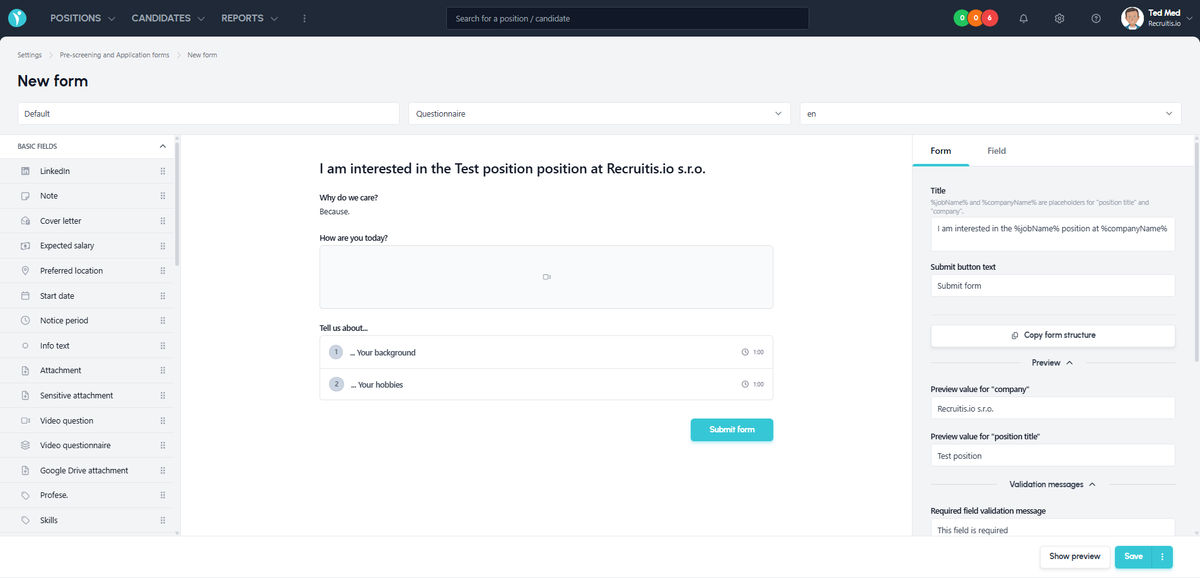
You add video questions in the questionnaire and application form editor (menu Settings | Pre-screening and Application forms). Next to standard fields such as name, email, phone or note, you'll find two new field types: Video question and Video questionnaire.
How to set it up
Open the form editor, choose a questionnaire or an application form and add one of the new field types:
- Video question is a single standalone question the candidate answers with a video. It works well for a quick introduction, for example "Tell us about yourself in one minute."
- Video questionnaire is a set of several consecutive questions in one block. The questions are revealed to the candidate one by one: the next question appears only after they save their answer to the previous one. The candidate doesn't see all the questions in advance and answers more spontaneously, much like in a real interview.
For each video question – whether standalone or part of a video questionnaire – you can set the maximum length and the question title, and add an optional description that helps candidates better understand what you're asking and why, so they can give you a more relevant answer.
You can then use the finished form in two ways:
- Send it as a questionnaire to candidates who are already in the recruitment process, using an email template for action type "questionnaire" with the particular questionnaire template selected.
- Set it as the application form for a specific position. Candidates then answer the video questions right when they apply.
What it looks like for the candidate
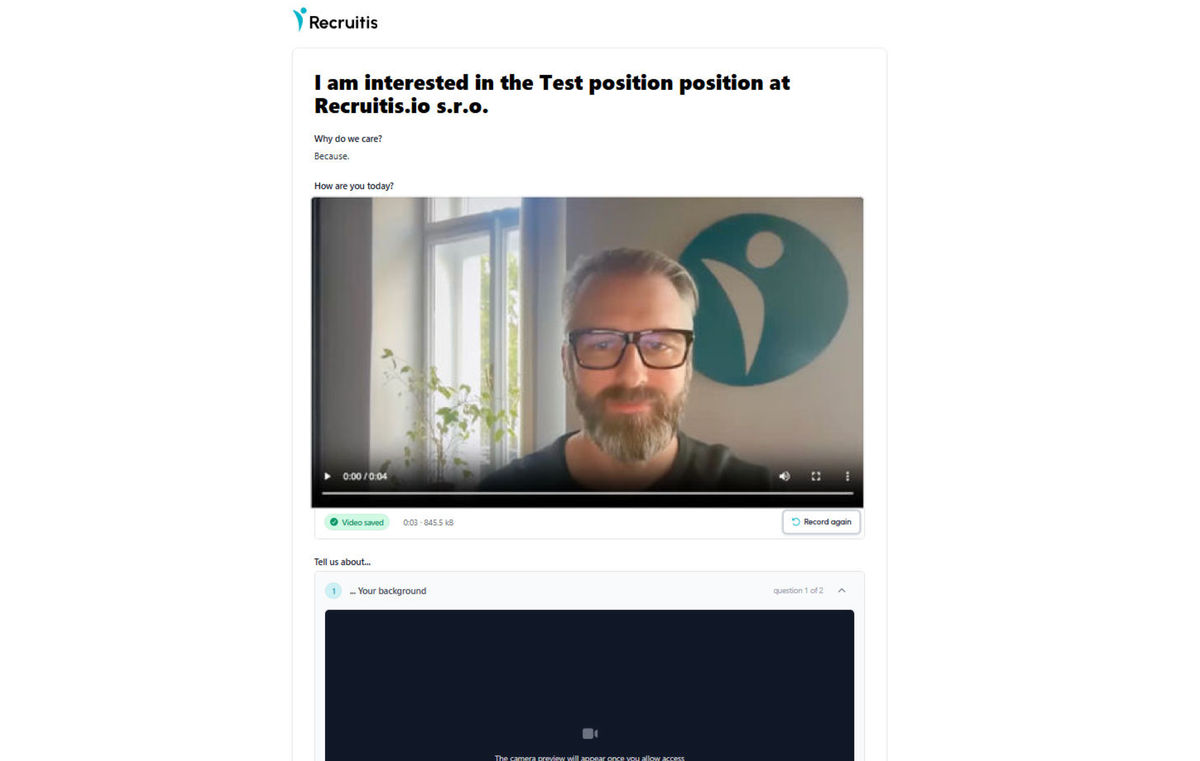
When the candidate opens the form, the video fields ask for permission to access their camera and microphone. For a video question, the candidate doesn't type an answer into a text field but clicks Record video. They can play the recording back right away and, if they're not happy with it, record it again.
What it looks like for you on the candidate card
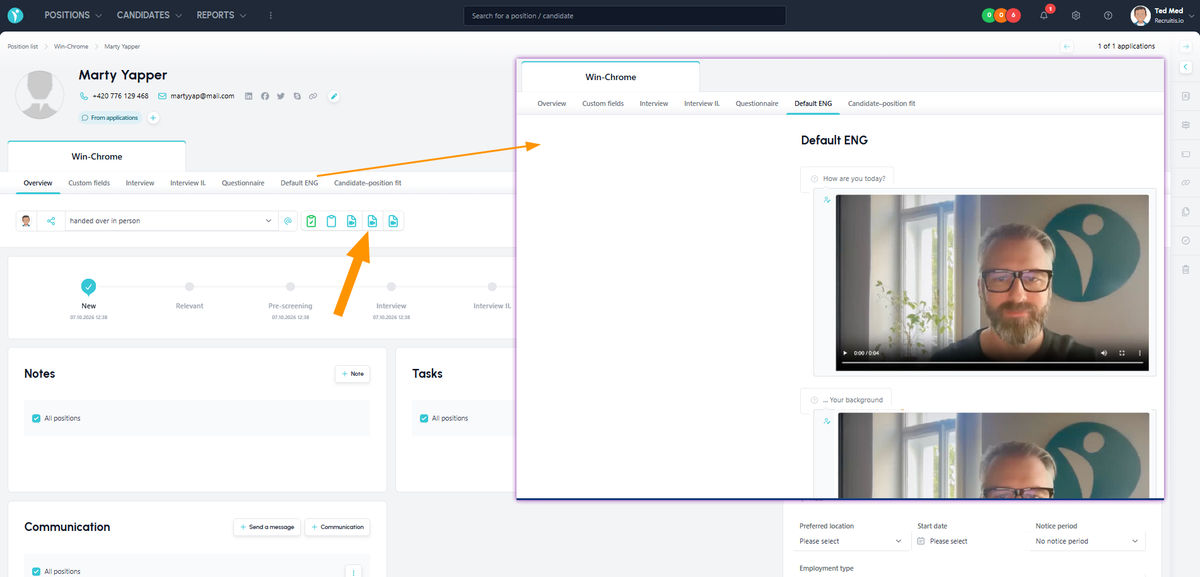
Once the form or questionnaire is submitted, the videos are saved on the candidate card as attachments, where you and your team can play them at any time.
If the video is part of a questionnaire, you'll also find it on the tab with the contents of the whole questionnaire.
Deleting videos and GDPR
Videos contain more sensitive personal data than a completed text questionnaire. That's why you can set a stricter deletion period for them than the one defined by the candidate's consent to the processing of personal data. You'll find it on the GDPR Settings page. This keeps videos under control and ensures you don't store data longer than necessary.
💡 Tips and practical examples
- A shorter first round: Replace screening calls with two or three video questions and invite only the candidates who caught your attention to an in-person interview.
- Language check: Ask one question in a foreign language and check the candidate's level right when they apply.
- Customer-facing roles: For sales, reception or support positions, you'll see how candidates speak and present themselves before spending time on an interview.
- Fewer automated applications: A video question in the application form naturally filters out mass-sent applications generated by bots.
- Keep questions short: 2–4 questions with a recommended answer length of up to 1 minute work best. It doesn't overburden the candidate and you can go through the videos quickly.
- One deletion period for all: Set the deletion period for videos right at the start, so you don't have to handle GDPR compliance manually.
Related articles
Webhooks for the Nelisa portal
Let ATS Recruitis automatically download your candidates from the Nelisa portal.
Impersonation
Combining the answers of a historically depersonalized candidate with a new answer.
Talent database and its possibilities
The talent database does not have to be used only for searching contacts for candidates.