Automatic extraction of CV data into structured fields
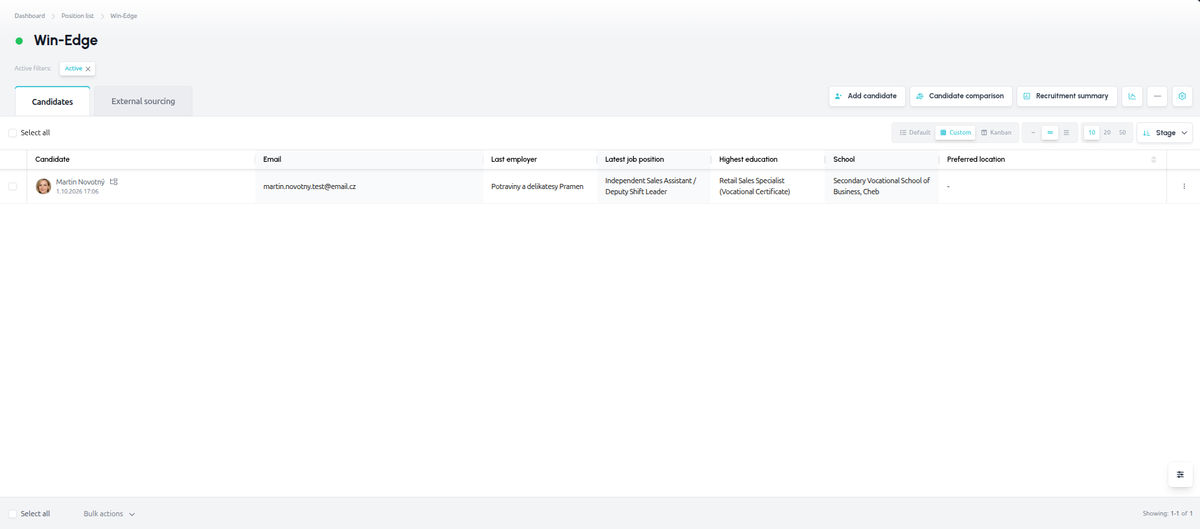
Going through dozens of CVs just to find out where a candidate last worked or which school they graduated from takes a lot of time. That's why Recruitis now automatically extracts key details directly from the CV and saves them into structured fields on the candidate. You see the most important information right in the candidate list, without having to open a single document. You can compare and sort candidates faster and pick the best ones.
💡 The feature is available from the Premium license.
Which details are extracted from the CV
The following fields are filled in automatically from the uploaded CV:
- Last employer
- Last job position
- Years in last employment
- Highest education
- School
How to display the fields in the candidate list
You choose which of these fields you want to see in the list in the custom row view of the candidate list. Just tick the fields you're interested in in the view settings and they'll appear as separate columns. This way, everyone can tailor the list to what they focus on most when selecting candidates.
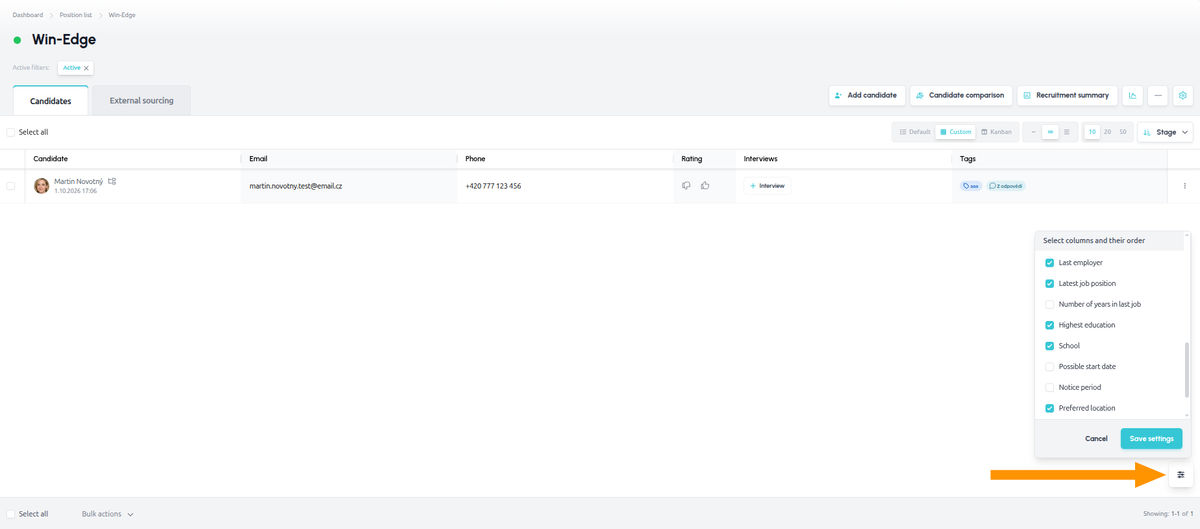
When the data appears
The details are extracted automatically when a candidate is created. Processing runs asynchronously in the background, so the fields may be filled in with a slight delay. If you don't see the details for a brand-new candidate yet, just wait a moment and refresh the page.
💡 The details also appear in analytics – in the "Candidates report", on the "By candidates" tab.
What happens with your data?
This AI feature in Recruitis is powered by a language model that we run ourselves, locally, within the Recruitis ATS infrastructure in the EU. We don’t use any public AI services. Your data, including candidates’ personal data, never leaves the Recruitis environment because of AI features, and no additional third party gains access to it. The model simply processes the data and returns the result. It doesn’t remember anything from it or retain it beyond the processing itself, and we never use your data to train or fine-tune it. Your data is protected by the same security rules and the same GDPR safeguards as all other data in Recruitis, as covered by our existing agreements. This lets you enjoy the benefits of AI and save time in your day-to-day work with candidates, without worrying about where your data goes.
Checking the data
The extracted details may not always be completely accurate. Their accuracy depends on how the CV is written and structured. For example, an unusual CV layout, concurrent jobs, or unclear or incomplete dates may be extracted incorrectly.
What this means in practice:
- Treat the extracted details as indicative. They're meant for a quick overview, not as the only basis for a decision.
- Verify the details directly in the CV before every important step. This applies especially when you're moving a candidate forward or rejecting them.
- Don't make decisions based solely on automatically extracted fields. Every candidate should always be decided on by a person who knows the full context.
The user working with the feature is therefore responsible for checking the accuracy of the data they use when selecting candidates. Recruitis saves you time, but the final decision always stays in your hands.
Related articles
Webhooks for the Nelisa portal
Let ATS Recruitis automatically download your candidates from the Nelisa portal.
Impersonation
Combining the answers of a historically depersonalized candidate with a new answer.
Talent database and its possibilities
The talent database does not have to be used only for searching contacts for candidates.