AI for Creating Job Ad Texts

As part of AI integration into our Recruitis ATS, we bring the option to use an AI assistant for creating job ad text.

You can find this feature in the position editor on the right side of the WYSIWYG editor, where clicking on it will display a menu of available assistants.
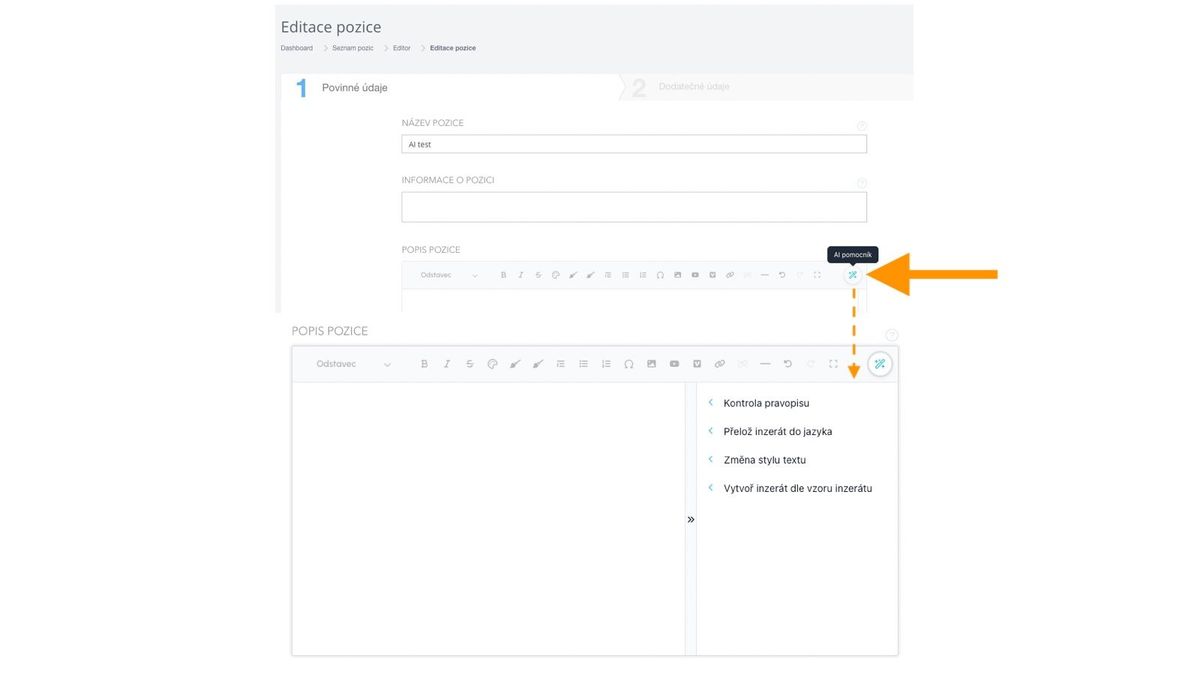
Description of individual assistants:

Spell Check

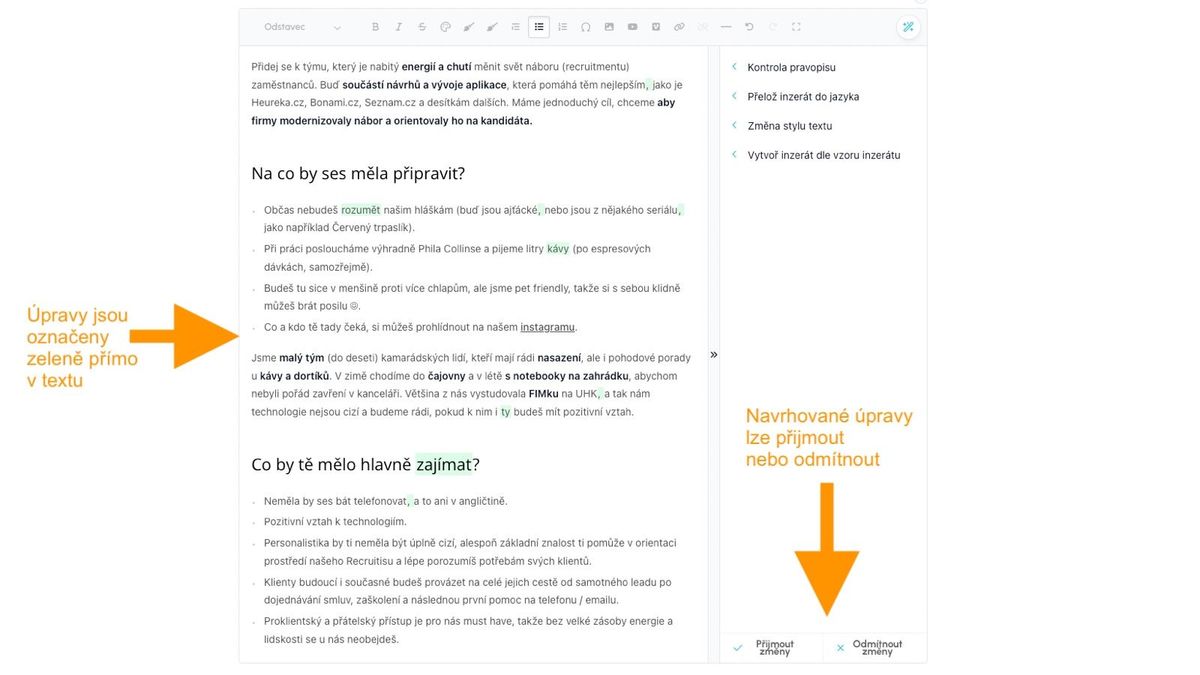
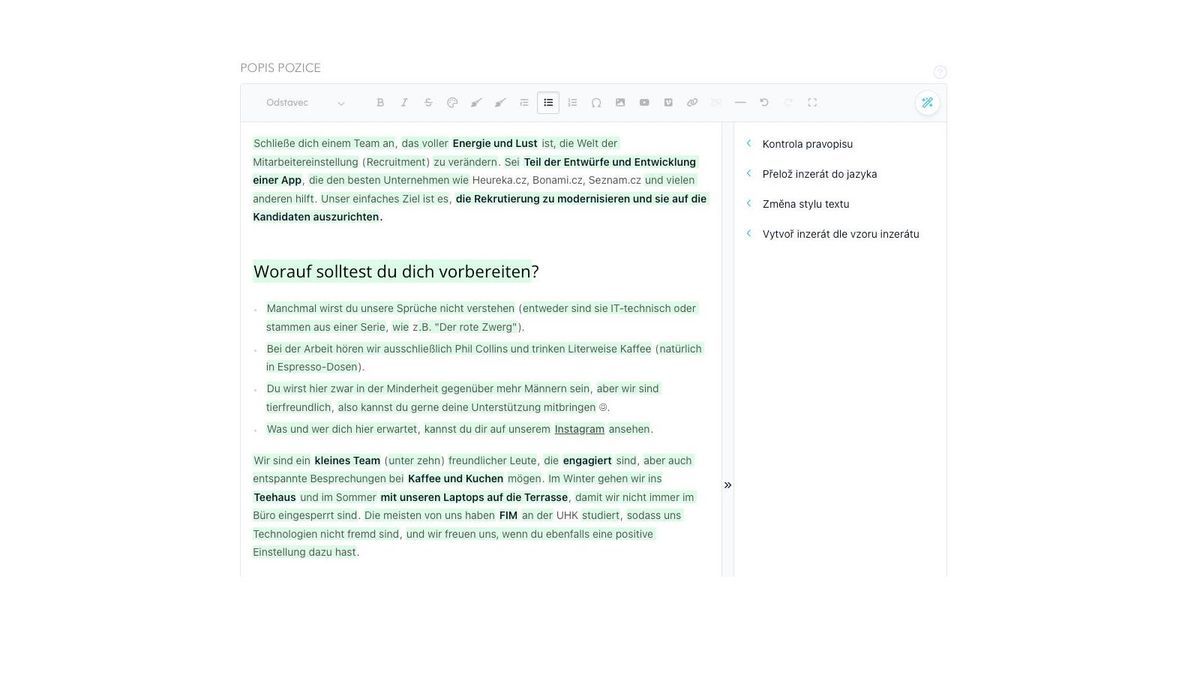
This function takes the text entered in the position editor and performs a spell check. The resulting text is gradually written back in the editor, where corrected words are marked in green.

Once the text generation is complete, an icon will appear in the bottom right corner to accept or reject the changes.

💡 If you disagree with any of the suggested corrections, you can manually edit the word in the editor before clicking the "Accept changes" button. The version displayed before clicking the button will be saved.
Překlad

Pro překlad si stačí v menu vybrat příslušný jazyk a poté vše funguje shodně, jako v případě kontroly pravopisu - text se postupně načítá a úpravy jsou označeny zeleně. V případě překladu je upravena drtivá většina slov, typicky vše kromě vlastních jmen, názvů apod.

Stejně jako v případě kontroly pravopisu můžete slova, která chcete přeložit jina upravit před přijetím změn.
Changing Text Style

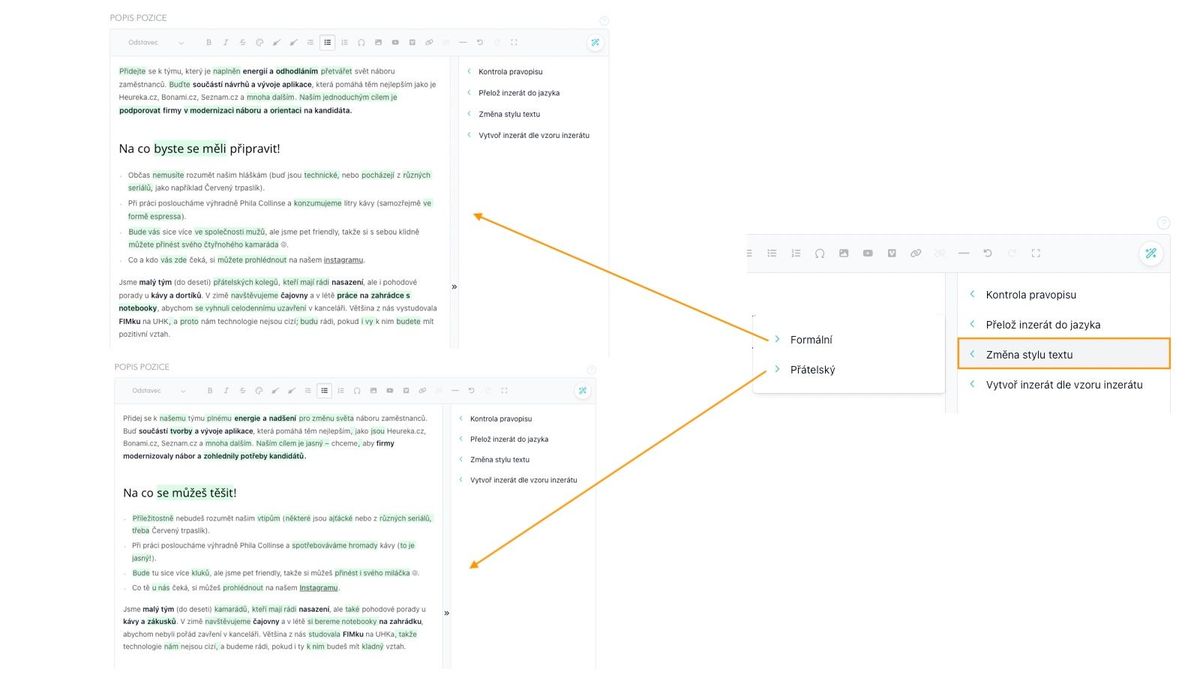
When changing the style of the ad, two options are available - modify the text to be written more...

  • formally
  • friendly

Vytvoření inzerátu ze vzoru

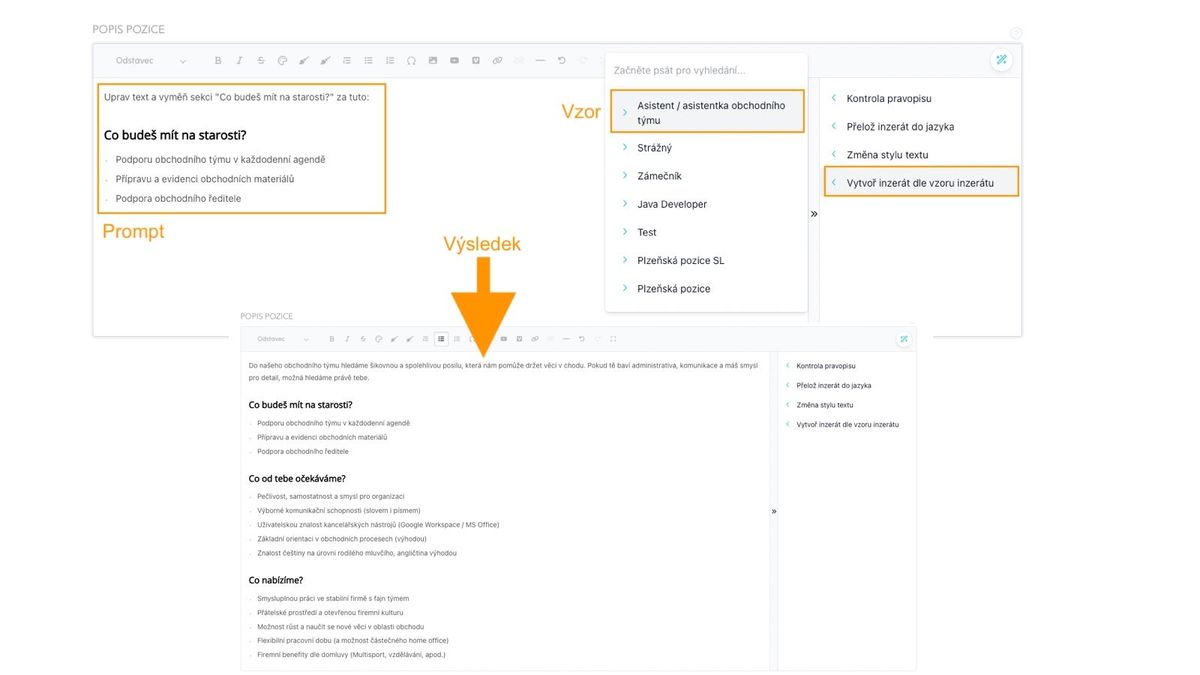
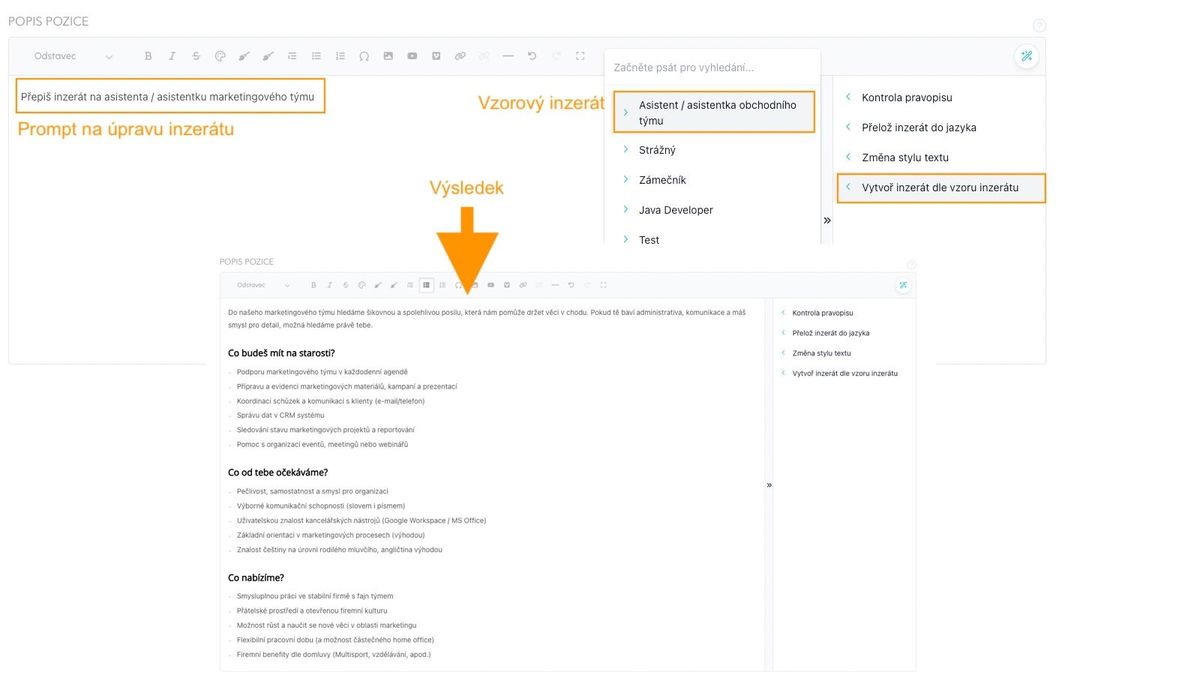
Narozdíl od změn výše, které provádějí úpravy a nebo korektury již hotového textu, tento pomocník slouží k tomu, aby Vám inzerát vytvořil. Konkrétně jde o vytvoření na základě kombinace:

  • existujícího inzerátu (tj. existující pozice v ATS Recruitis, kterou si vyberete ze seznamu)
  • instrukce, kterou máte momentálně zapsanou v editoru pozice
    • instrukci si představte jako prompt, který byste jinak zapsali např. v ChatGPT, aby vám přiložený inzerát upravil
    • např. "uprav inzerát, aby byl na vedoucího směny", "přepiš inzerát, aby byl na asistenta marketingového oddělení místo obchodního oddělení", "Připiš následující požadavky..." vyměň položky v sekci "Nabízíme" za tyto položky..." apod.

💡 U tohoto pomocníka, na rozdíl od těch předchozích, nemáte po vygenerování možnost přijmout nebo zamítnout změny, protože celý text je generovaný. 
Obecné vlastnosti AI pomocníka

  • Výsledky dotazů do AI se vrací přímo do okna editoru
  • Změny jsou vyznačené a máte možnost je přijmout nebo zamítnout
  • Pokud AI ještě vrací výsledek (tj. po kliknutí na konkrétní úpravu), text zmizí a začne se po chvíli postupně vypisovat do okna editoru, zatímco se točí kolečko uvnitř ikony pomocníka
    • Poté, co je výpis kompletní, objeví se vpravo dole tlačítka pro přijetí nebo odmítnutí změn


ATS Recruitis Features SLA ReportRejection ReasonsGoogle Chrome PluginExternal Sharing of Candidate CardsOption to track phone rejection rateFilling in Candidate Personal Data Directly from CVCompany Pages for Internal Positions within ATS RecruitisCustom HTML Job Offer TemplatesNotifications About New Candidates Including Manually Added OnesPhone calls via mobile app from desktopTwo-Factor AuthenticationMultiple Entities Within One LicenseAnalytics - Requests ReportVideo Link in Position Editor"Position Settings" MenuOption to Disable Adding Smart Email to Copy of Messages to CandidatesConnecting the Volnamista.cz Publication ChannelAutomated Sharing and Tagging of CandidatesOption to Choose NPS SenderAnalytics - Candidates ReportGoogle Chrome Plugin for StartupJobs PortalAdding a Map to Email TemplateScrolling the Notes WindowDynamic Loading of Filter Items via APIRepeated Candidate Response to the Same PositionEmail Template ManagementCustom HTML Email TemplateForcing Response Form LanguageCalendar (Redesign)Notifications About Emails Sent Only to System EmailFiltering Positions by Ownership and SharingReporting Custom Field ValuesWorking with interview invitationsGoogle Chrome Plugin for Profesia PortalMicro-pools in the Candidate DatabaseEmail Sending Dialog (Redesign)Tag CategoriesCandidate Rejection ReasonsAssigning TasksNew Candidate Card (Redesign) - Beta Version SwitchWork Fields and Professions as Optional Field for PositionInternal NPSAnalytics - Custom Fields ReportRequest ApprovalMoving Accepted Candidates Outside ActiveFilter Items - Practical Usage ExamplesCandidate CardRecruitment FlowPositionCandidate Actions - Copying and Moving Candidates to PositionWorking with TagsWorking with AttachmentsTask OverviewCompleting TasksTasksActivity FeedCreating a PositionPosition Settings MenuPosition PublicationInterview Notes - Transition Between Old and New CardGoogle Chrome Plugin for LinkedIn Message SynchronizationGoogle Chrome Plugin for Loading Gmail MessagesAI for Creating Job Ad TextsIntegration with Profesia Portal via WebhookCandidate Offer FormUser RolesIntegration with Indeed PortalSwitching Between Multiple Accounts in ATS RecruitisReferral with Obtaining Recommended Candidate ConsentAnalytics - Introduction to BI ModuleDashboard on the Main PageAI for Job Ad Competitiveness ComparisonMessage Sending DialogRequisitions - HTML Editor and TemplatesPre-rejectionCommunication Record with CandidateCandidate Responses in One PlaceInterview PlanningQuestions from Truly Good CandidatesWorking with Hiring ManagersInterview QuestionsSetting and Monitoring FeedbackFiltering Candidates in Database by SourceHot CandidatesGender Variable in Email TemplatesOnline Interviews Directly from RecruitisAnalytics - Positions ReportBulk TaggingGoogle Chrome Plugin for LinkedInQuick Interview PlanningGDPR Changes in the SystemCandidate ComparisonIntegration of New Responses from StartupJobsIntegration with Slack.comIntegration with CzechCrunch JobsCustom Response FormsNotifications About All Notes on Your PositionsVariable Recruitment Process PhasesAnalytics - Conversion ReportInterview overview - Meetings menu

Related articles

23. 05. 2023

SLA Report

In addition to measuring SLA directly on the ATS Recruitis homepage, you can have a report generated via email.

14. 05. 2025

Rejection Reasons

When rejecting a candidate, you can record the reason for rejection, which is automatically reflected in your statistics and reports, and also serves as a tool for searching candidates in the database. This allows the reasons to be best tailored to your needs.

04. 05. 2022

Google Chrome Plugin

A plugin enabling saving candidates from LinkedIn and several other portals.