Recruitis Plugin
The Recruitis plugin is a tool that lets you add a candidate into ATS Recruitis directly from your browser, either to a specific position or to the talent pool.
Download link
https://chromewebstore.google.com/detail/recruitis-plugin/hkmplpclfgpcfikknjmehbmfemjabaha
Installing the plugin
- After clicking the download link above, click the "Add to Chrome" button
- Then pin the plugin to the browser toolbar
- After adding it to Chrome it is a good idea to close and reopen the browser so that the plugin loads 100 % correctly
- The easiest way to sign in to the plugin is directly in ATS Recruitis (see the description below)
- The plugin will then be active
- When you then use the browser on a supported site on a candidate profile, the loaded candidate information appears in the plugin and you can save the candidate into ATS Recruitis
Signing in to the plugin
You can sign in to the plugin in two ways:
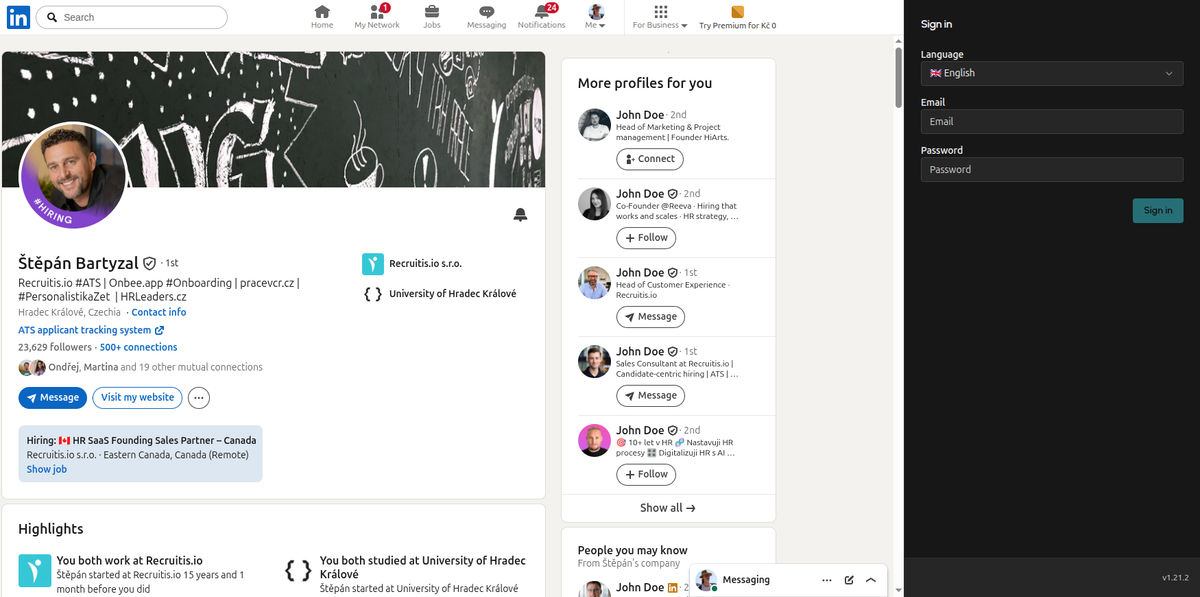
- With the username and password of your ATS Recruitis account
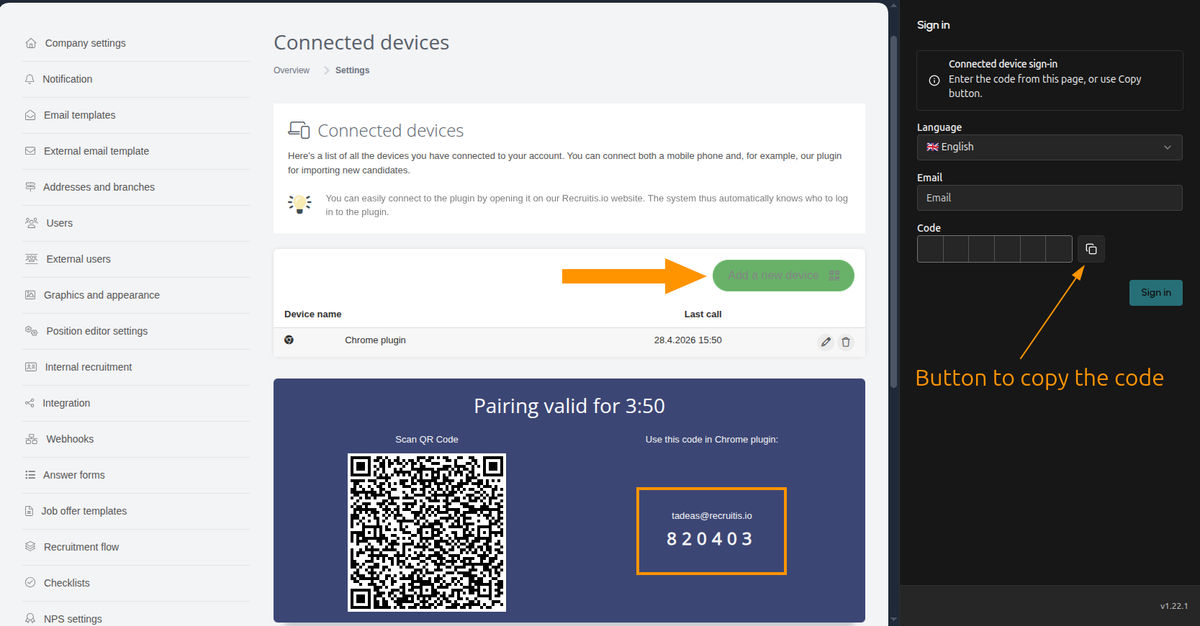
- With a one-time code in the connected devices settings (link)
- This has to be used if you sign in to ATS Recruitis using SSO
Settings
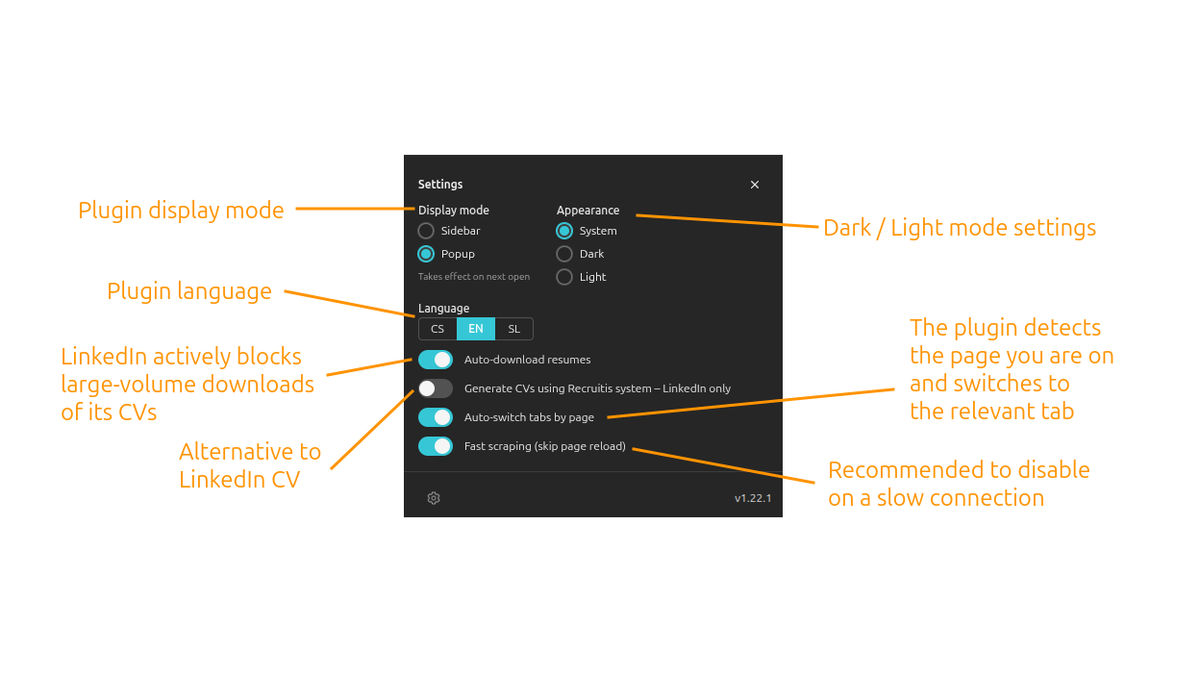
Besides the self-explanatory settings such as language and appearance, the following behaviour can also be configured:
- Download CVs automatically – you choose whether the plugin downloads candidate attachments automatically. This is worth considering when downloading and browsing candidates on LinkedIn in larger volumes, because LinkedIn actively monitors this and has restrictive measures in place (see the description below).
- Generate CVs using Recruitis – similarly to the point above, this setting helps prevent restrictions from LinkedIn. In this case the CV is generated directly by the plugin from the candidate's profile in HTML format and a PDF is not downloaded from LinkedIn.
- Switch tabs automatically – this setting determines whether the plugin switches to the tab matching the page you are currently on in LinkedIn, or whether it stays on the tab you selected inside the plugin.
- Fast scraping – this setting determines whether scraping performs a full page reload before it starts loading. On slower connections the scraping may start before the page has finished loading, which leads to errors.
💡 In the current version the plugin works on LinkedIn, Teamio, StartupJobs, Profesia and in Gmail.
Use on LinkedIn
In the new plugin, actions and the display of information are organised differently than in the previous version.
Downloading candidate information
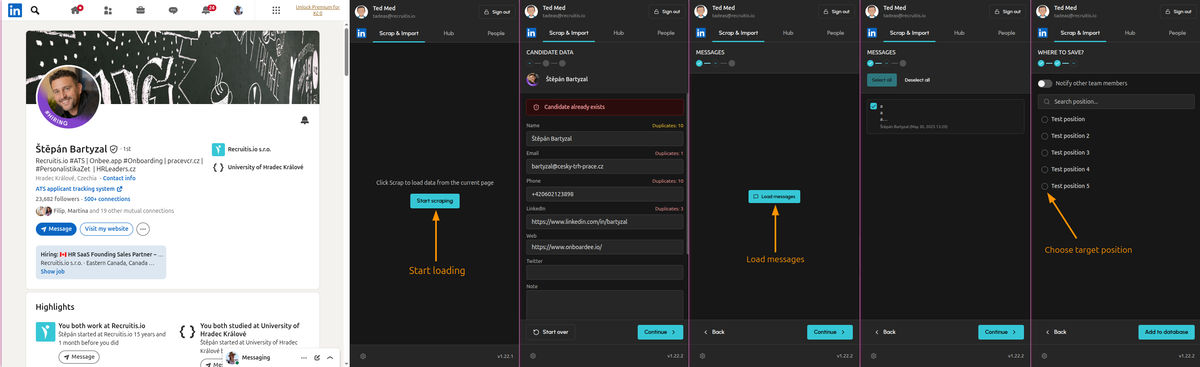
Downloading candidate data happens in 3 steps and only after the "Start scraping" action is triggered.
- The plugin first opens the window with the candidate's contact information and loads the data.
- Then you can also have the messages with that profile loaded
- In the last step you choose between saving to the database or to a specific position.
Hub
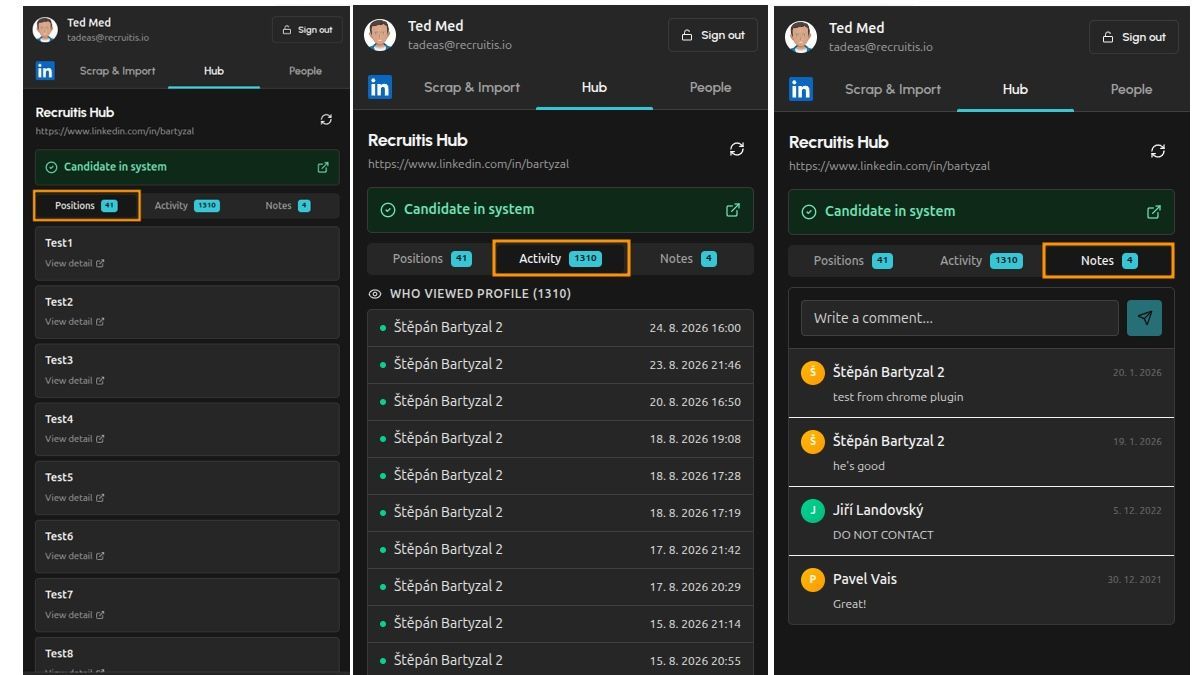
The Hub shows information about the given candidate in 3 tabs:
- Positions – which positions you already have the candidate saved on in ATS Recruitis
- Activity – who from your team saw this profile and when (i.e. people who use the ATS Recruitis plugin under your licence)
- Notes – notes written within the plugin on LinkedIn
The "People" tab
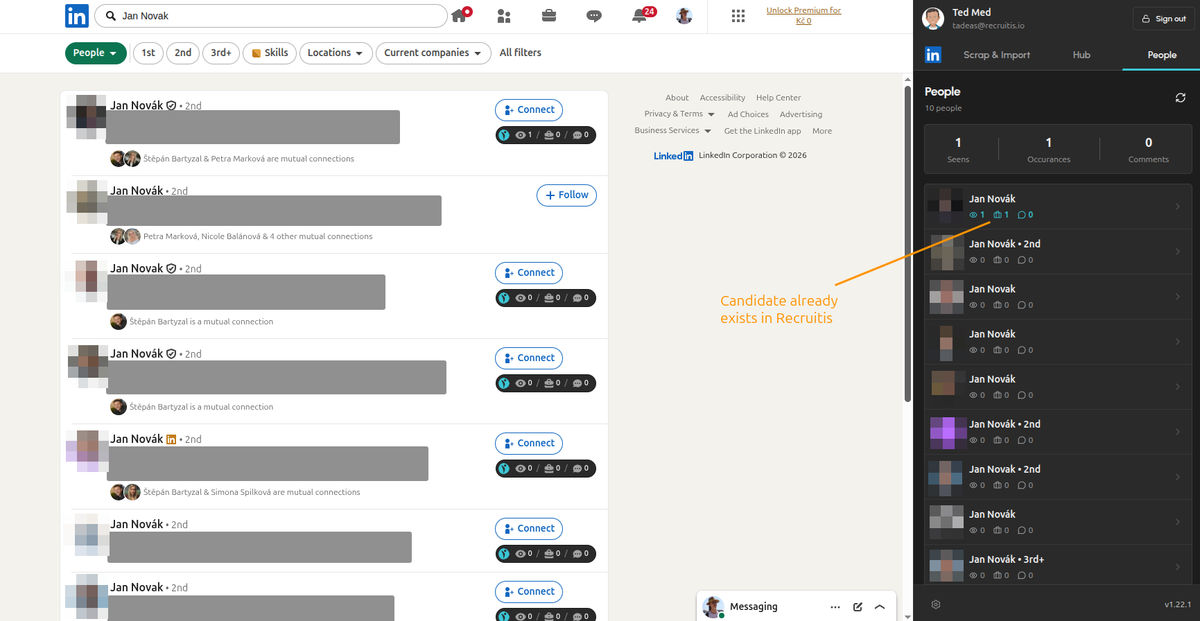
When searching on LinkedIn, you can display the "People" tab on the search results page, where you will see basic information from the Hub – that is, whether you already have the given profiles saved in ATS Recruitis, and if so, clicking on the person switches you to their Hub tab.
Use on other portals
The use is analogous to LinkedIn – you always need to be on the candidate's profile and start the scraping process.
💡 Good to know
Can I use this plugin together with the old one?
Yes, definitely. If you use the plugin in places other than those currently covered by the new plugin (typically outside LinkedIn), you can use both in parallel.
Can I use this plugin in the Edge browser as well?
Yes, most Google Chrome plugins can also be used in Microsoft Edge, because Edge is built on the same engine as Chrome – Chromium.
How to do it:
- Open Microsoft Edge.
- Go to edge://extensions.
- At the bottom left, turn on the "Allow extensions from other stores" switch.
- Confirm the dialog.
- You can now go to the Chrome Web Store (https://chrome.google.com/webstore) and install any extension just like in Google Chrome.
What should I do if the plugin does not load the candidate?
Because of changes made by LinkedIn or the other supported portals, it may happen that some of the data on the candidate profile is not loaded in the current version of our plugin.
We will be glad if you report any problem, because on LinkedIn, for example, changes are released gradually, so there are users who still see a given LinkedIn profile in the same way and then someone who already sees it in the new form where a certain value may no longer load.
If you have the plugin installed directly from the Chrome Store and automatic updates enabled, you will have the fixed version available as soon as possible, because we react to changes within days of a problem being reported.
Can I use the plugin without limits?
From the ATS Recruitis point of view there is no limit.
However, if you are someone who browses and quickly downloads large numbers of candidates on LinkedIn on a daily basis, it may happen (because LinkedIn regularly tracks and actively monitors the behaviour of users and various tools on its pages) that LinkedIn evaluates the behaviour on your account as suspicious and potentially caused by an automation tool, which may even lead to your account being temporarily restricted.
Besides using our plugin less frequently, if this is your scenario you can also limit certain activities directly in the plugin settings:
- turn off automatic CV downloading
- turn on the HTML version of the CV instead of the default LinkedIn PDF CV, which is monitored and has a limit (100 CVs / day)
Related articles
Webhooks for the Nelisa portal
Let ATS Recruitis automatically download your candidates from the Nelisa portal.
Impersonation
Combining the answers of a historically depersonalized candidate with a new answer.
Talent database and its possibilities
The talent database does not have to be used only for searching contacts for candidates.