Internal sourcing

Help Recruitis · Updated

Let Recruitis search your talent pool for you

The right candidate may already be waiting in your database. Instead of searching manually and maintaining tags, just open a position and Recruitis will suggest candidates from previous selection processes for similar positions. The ranking is based on the real history of your recruitment – on your recruiters' decisions and ratings, not on keywords in CVs. You save time and put to use candidates you've already invested in.

How does it work?

Recruitis takes four inputs from the current position:

  • the position title,
  • the position description,
  • the requirements in the description,
  • the place of work (location).

It then compares this data with all historical positions in your database and, for each of them, calculates a match score based on how closely the text in the individual fields matches.

It then ranks candidates from these positions according to criteria based on your recruiters' decisions:

  • how far the candidate got in the previous selection process,
  • how the recruiters rated them,
  • the reason they were rejected, if any.

There are no hard rules such as "they must reach at least a certain round". A recently rejected candidate generally won't make it into the recommendations unless they are the only option.

You set the weights of the criteria

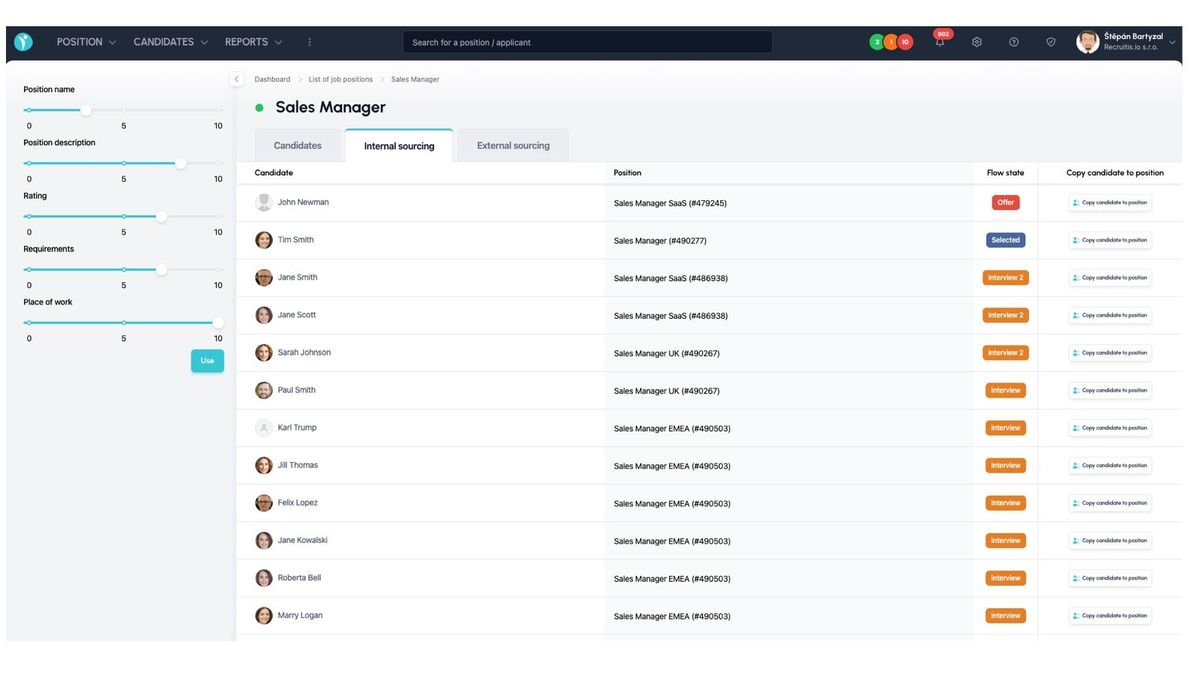
You decide how much each criterion affects the ranking. On the left-hand side, there are sliders (0–10) for:

  • Position name
  • Position description
  • Rating
  • Requirements
  • Place of work
  • Rejection reason

After you click "Use", the ranking is recalculated according to your settings. For example, if you set "Rejection reason" to 0, you'll also see candidates who were rejected for negative reasons. If you set "Position name" to 10, candidates from positions with the same title will be given priority.

The system doesn't change, optimize or learn the weights from historical data on its own. The only exceptions are predefined rules – for example, for a position marked as fully remote, location automatically carries less weight.

Where to find the feature and how to use it

Each position has an "Internal sourcing" tab. When you open it, a ranked list of candidates is displayed.

  • For each candidate, you can see their name, previous position, rejection reason and the date of the last action.
  • Click a name to open the right-hand panel with all of the candidate's details.
  • Add selected candidates to the position using the "Copy candidate to position" button.

The feature doesn't reject anyone, doesn't contact anyone automatically and doesn't move anyone into the selection process. You always decide which candidates you'll continue working with.

Internal sourcing and the AI Act

Internal sourcing ranks candidates according to predefined rules and weights set by the user and doesn't use machine learning. According to a legal assessment, it therefore doesn't meet the definition of an AI system under Article 3(1) of Regulation (EU) 2024/1689 (AI Act). The feature can be turned off at the account level.
ATS Recruitis Features Webhooks for the Nelisa portalImpersonationTalent database and its possibilitiesAccount line manager vs. account with limited rightsKanbanManage profile photosProcessing the candidate list in the database (alternative to exporting candidate contacts)Connection of personnel advertising on the Linkedin network with ATS RecruitisCopying and moving a candidatePrinciples of functioning of the candidate cardRecruitment flow and connection with email templatesUpload a response from a LinkedIn adClearing the image cache when sharing a position on LinkedInAdjusted dialogs for copying and moving a candidateSave the interview question templateScheduling a candidate interview right in your calendarAd response source vs. candidate resourceCandidate Service Prioritization (SLA)Management of communication regarding the rejection of applicantsNew GDPR filters in the databaseReports and statisticsGDPR consentsRecovering a deleted user accountReferralUser managementMulti-brand in email communication with candidatesFilters in position listsNPS metricApplicant import historyPractical example: candidate deletion vs. removing the answerForeign advertisementsLogin to the mobile application using a QR codeOffers to candidates (offer management)Attachments of the applicantConfidential job positionCustom fieldPlace of workPreferred locationWebhooks for system eventsRenaming the candidateTagging notesOption to cancel sending NPSExpedited position publicationApplication for opening a position ("requests")SMTP settings for sending emailsElimination of the applicantWho has access to the candidate cardAutomatic responseClassified ads and ad templatesSending SMS from ATS Recruitis RecruitisBulk actionsTo cancel a delayed email sendPosition sharing opportunities through ATS Recruitis' internal career siteConnection with the fajn-brigády.cz portalWithdrawal of consent to the processing of personal dataA reminder to take action with the candidatePublications to the profession portal via APISend emails from Recruitis using your Outlook365 accountThe function to remove candidates from a position directly in the talent databaseCalculation of the reaction time between each flow stateInterview scheduling by the candidate with evaluation of multiple calendarsScheduling an interview by a candidate with the possibility of multiple candidates on the same dateOption to select the interview date for the candidate Ability to create multiple internal ATS Recruitis calendarsAssigning a branch location from the JenPráce job portal codebookEmail delivery problems (undelivered emails or spam)Creating a Polish advertBackward shift in recruitment flowInserting images in the ad editorOption to disable SLA measurement for a specific positionFilter NPS statistics results by recruiterFilter NPS statistics results by recruiterAbility to approve a job offer by multiple approversFiltering in the database of candidates by start date and notice periodChecklistIntegration with the Slovenian Portal MojeDelo.comTimezones in calendarSLA ReportRejection ReasonsGoogle Chrome PluginExternal Sharing of Candidate CardsOption to track phone rejection rateFilling in Candidate Personal Data Directly from CVCompany Pages for Internal Positions within ATS RecruitisCustom HTML Job Offer TemplatesNotifications About New Candidates Including Manually Added OnesPhone calls via mobile app from desktopTwo-Factor AuthenticationMultiple Entities Within One LicenseAnalytics - Requests ReportVideo Link in Position Editor"Position Settings" MenuOption to Disable Adding Smart Email to Copy of Messages to CandidatesConnecting the Volnamista.cz Publication ChannelAutomated Sharing and Tagging of CandidatesOption to Choose NPS SenderAnalytics - Candidates ReportGoogle Chrome Plugin for StartupJobs PortalAdding a Map to Email TemplateScrolling the Notes WindowDynamic Loading of Filter Items via API

Related articles

15. 05. 2022

Webhooks for the Nelisa portal

Let ATS Recruitis automatically download your candidates from the Nelisa portal.

19. 05. 2022

Impersonation

Combining the answers of a historically depersonalized candidate with a new answer.

24. 05. 2022

Talent database and its possibilities

The talent database does not have to be used only for searching contacts for candidates.