SSO
Single Sign-On, abbreviated SSO, is a technology that allows users to access multiple applications or services using a single login. This means that instead of having to remember another username and password for ATS Recruitis, you can log in using your Google or Microsoft account.
How to activate Google SSO?
Just contact our customer support and we will enable Google SSO login for you immediately.
How does it work?
- The user must have an account in ATS Recruitis created under their company Google email
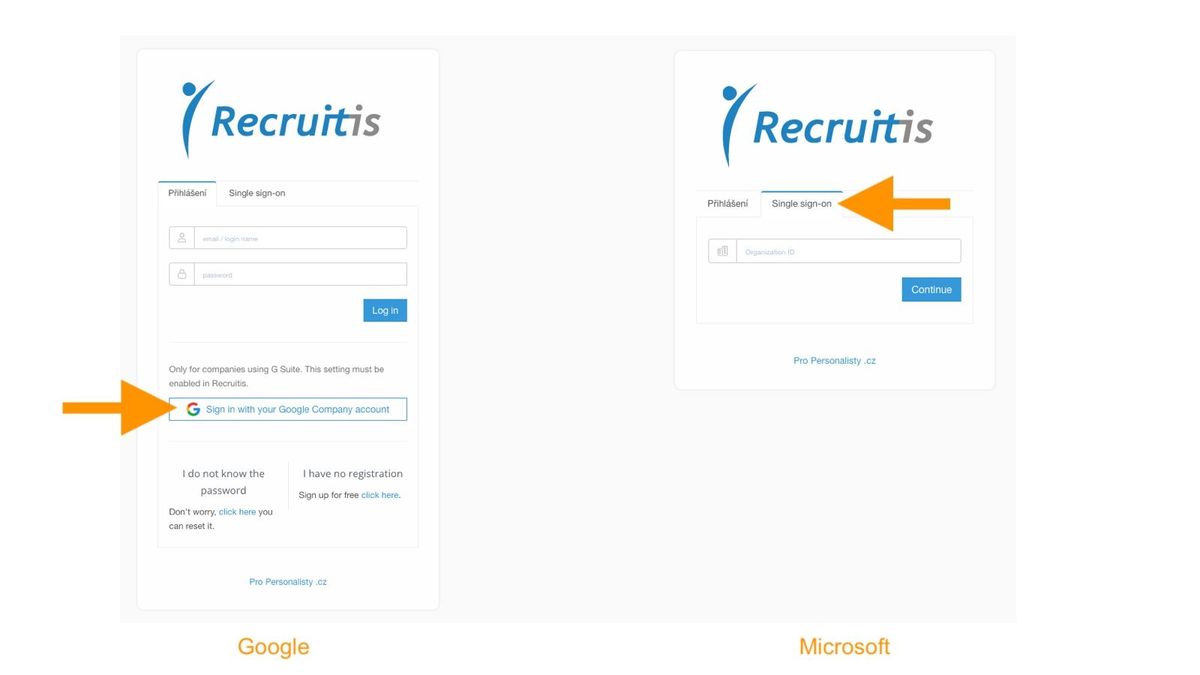
- In the login dialog, instead of entering a username and password, click on the Google icon and log in with your Google credentials in the classic Google dialog.
Microsoft (Azure)
How to activate Azure SSO?
Even in the case of Azure SSO, it is necessary to activate Azure login through our customer support. But there are two approaches for Azure that differ in the activation procedure.
a) Recruitis Azure application variant
- On your Azure side, you only need to create a service principal in the tenant according to our application client ID (Microsoft help)
- Otherwise, when trying to log in via your Microsoft account, error AADSTS7000112 will appear, which means our application is "disabled" on your side
- Our application Client ID is 0fdf7f15-628b-4dd1-aea3-5c27e3f2dcdb
- It is also important that you must not block cross-tenant access on your Azure side
b) Your own Azure application variant
- You create your own Azure application for Recruitis SSO
- In the application in the authentication section, set
- Web - Redirect URIs: https://app.recruitis.io/sso/azure/callback + for integration development, add https://recruitis.dev/sso/azure/callback
- Logout URL: https://app.recruitis.io/sso/azure/logout
- Supported account types - in case of one company, we recommend "Accounts in this organizational directory only (Recruitis s.r.o. only -- single tenant)"
- In the Certificates and secrets section, you need to create a new client secret
- You need to send us the secret value together with the application ID.
- At the same time, we will also need to create a test account in your tenant and have the recruitis.dev domain as callback
The choice between the first and second variant is usually decided by your IT department and their policies.
How does it work?
For both applications, the same usage principle applies:
- in the login dialog, select the "Single sign-on" tab
- enter the ID for your account (our customer support will tell you this upon activation)
- you will be redirected to the classic Microsoft login dialog
Related articles
Example of JenPráce.cz publication channel settings
Explanation of the functioning of the principle of integration using a data XML feed using the example of setting up the publication channel JenPráce.cz.
Foreign job portals
List of foreign job portals with which we know about connection possibilities and its description.
An example of setting up the Welcome to the Jungle publication channel
An example of setting up the Welcome to the Jungle publication channel