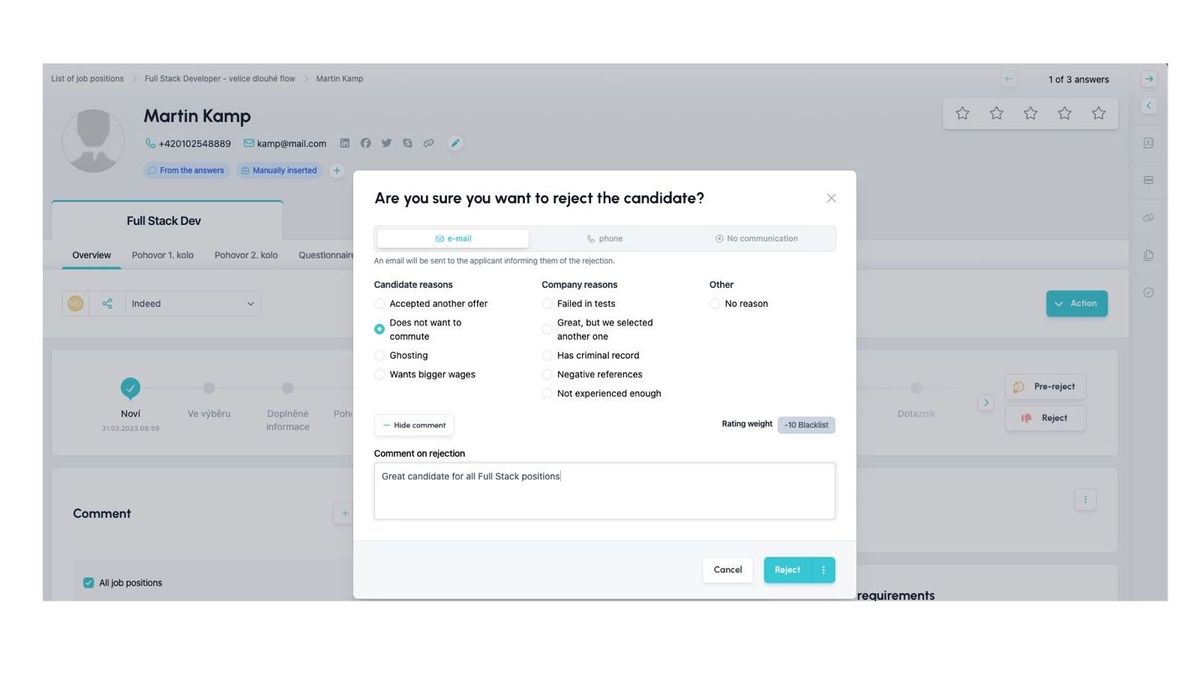
Setting the weight of a rejection reason
In Recruitis, we are extending the way you work with rejection reasons by introducing two new elements that will help you better manage candidate history and make more effective use of the upcoming "Suggestions" feature (automatic candidate suggestions for newly opened positions).
Rejection reason weight
Each rejection reason can now be assigned a numerical weight ranging from -10 to +10, which expresses how strongly the given reason should be reflected in the future evaluation of the candidate:
- Strongly negative values (e.g. -10) indicate so-called "KO" reasons – i.e. situations where the candidate is fundamentally unsuitable for your company and there is no point in contacting them again in the future (for example, failing to meet key legal requirements, problematic references, problematic behavior, etc.).
- Values around zero represent a neutral rejection without any significant impact on future recommendations.
- Strongly positive values (e.g. +10) indicate cases where you have to reject the candidate (typically because you don't have an open position or you have decided in favor of another candidate), but the person is a talent you want to "keep on your radar" and preferentially offer another opportunity to in the future.
This weight is saved with the candidate and will be reflected in the upcoming "Suggestions" feature, where candidates with a positive weight will be preferentially suggested in the list of recommended candidates for a position, while candidates with a strongly negative weight will not be suggested at all.
It is also possible to assign a tag to individual values on the scale, which will be used to label the candidate. For example, for rejection reasons with a value of -10, I can set the system to automatically tag such candidates with the "Blacklist" label.
Ad hoc note for the rejection
In addition to selecting the reason and its weight, you can also attach a free-form note to a specific candidate. This serves to capture the context of a particular situation – for example, clarifying why the candidate was rejected, adding that multiple reasons played a role in the rejection, what to watch out for when contacting them in the future, or which position might be suitable to offer them next time. The note is tied to a specific rejection, so the history remains transparent even if you encounter the candidate again in the future.
Setting the weights of rejection reasons
Two new options have been added to the rejection reasons settings dialog:
- For each reason, you can enter a weight as a whole number in the range from -10 to +10 when creating or editing it.
- The selected weight is then displayed on the row with the corresponding rejection reason.
- If you then select this reason in the rejection dialog, this weight will be assigned to the candidate's rejection.
- You can also select an email template that will be automatically pre-selected in the rejection email dialog when this reason is chosen.
- In the "Tags based on rejection weight" section, you can map specific weight values to a specific tag.
- For example, you can set all reasons with a weight of -10 to automatically tag the candidate with the "Blacklist" label.
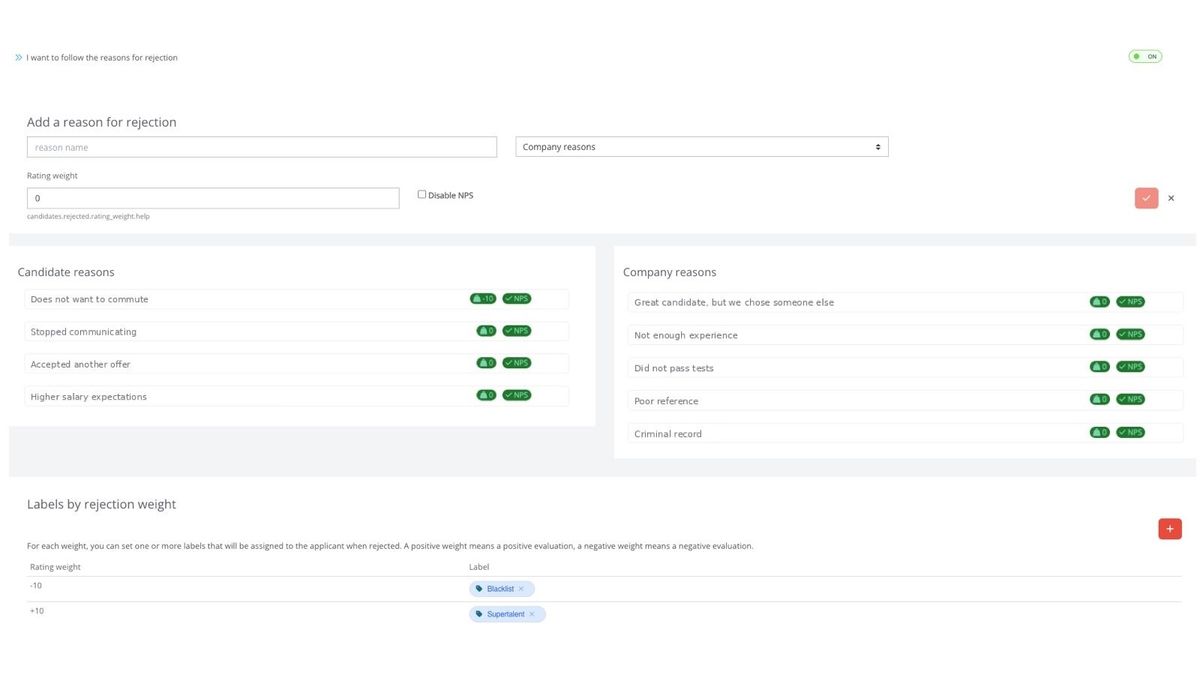
Entering rejection reasons
In the rejection dialog, you can now see the weight assigned to the selected reason, and if a tag is associated with the given weight value, that tag will also be displayed.
You also have the option to add a text note.