Automatic position sharing using filter items
One of the typical ways to use filter items is to assign them to positions based on department, division, branch, etc. In these cases, there are managers who are responsible for positions falling under a given filter item, so a rule can be created that says, for example: If a position has the filter item "Headquarters", manager XY should have access to it (and its candidates).
It is precisely for these scenarios that there is functionality that allows you to set up such automatic sharing.
Settings
This sharing can only be set up by administrators, by selecting one or more filter items that the given colleague monitors in the settings of specific users (link).
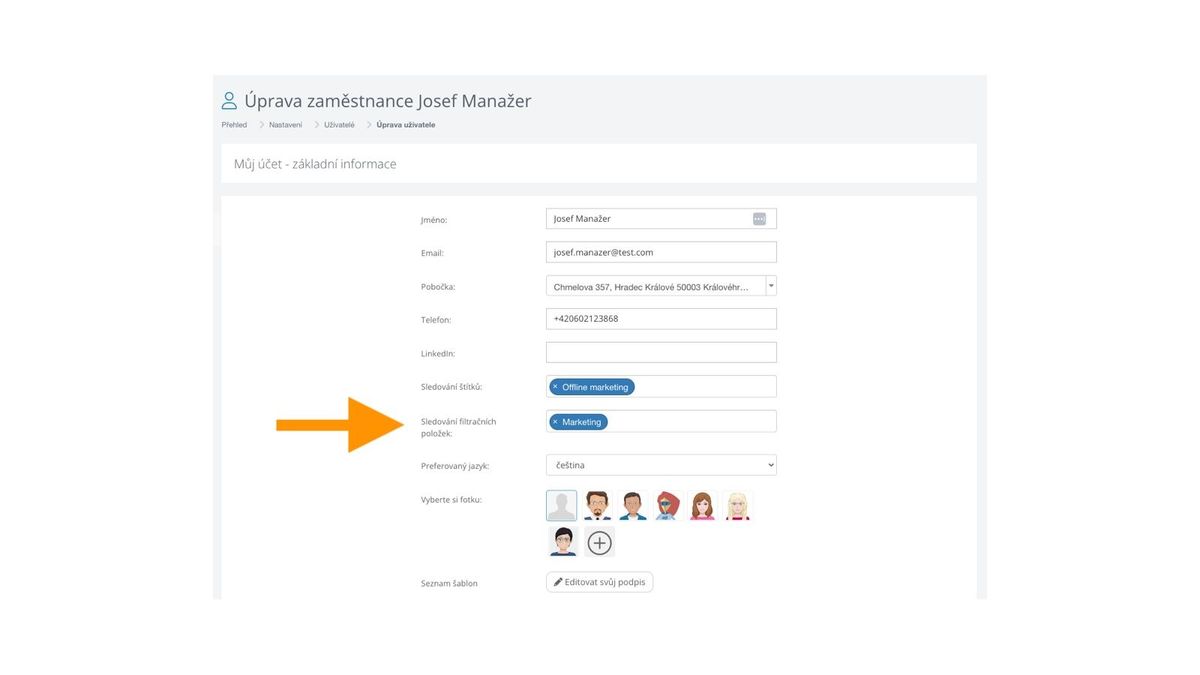
Automatic sharing behavior
In practice, such monitoring means:
- If anyone adds a filter item that you are monitoring to a certain position, it will be shared with you immediately.
- Along with the position, all existing candidates will be shared with you, as well as future ones (i.e., identical behavior to manual position sharing).
- One user can monitor multiple filter items.
If you want to unshare a position shared in this way, you must do it, just like with manually shared positions, using the manual sharing dialog.
